Catalog & Inventory Orchestration
Enable agentic commerce by synchronizing your existing product data with the global AI ecosystem.
To sell products via agentic platforms (such as ChatGPT, Gemini, and Perplexity), your product data must be "agent-ready." This means it is not only structured for machine readability but also synchronized in real-time to prevent over-selling and ensure accurate attribute discovery.
Forter Agentic Orchestration acts as the orchestration layer between your backend (Shopify, Google Merchant Center, Salesforce Commerce Cloud, SFCC) and the various AI Model Context Windows and Tool-Calling APIs.
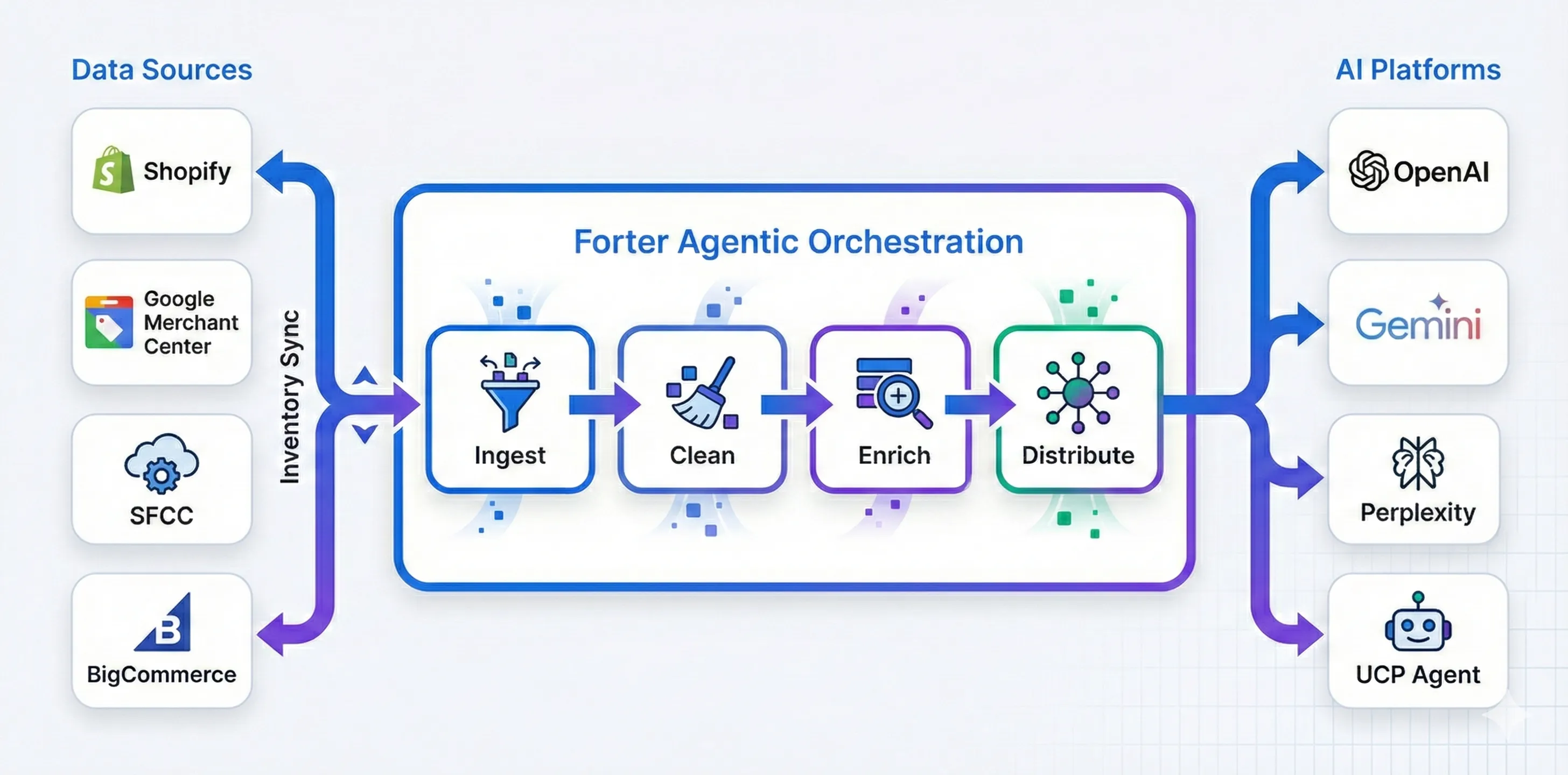
1. Integration Methods
Forter Agentic Orchestration supports three integration methods based on your e-commerce setup. Choose the method that matches your platform:
A. Custom Integration
For merchants who build their own commerce backend.
You host a product feed at a stable URL, and Forter fetches it periodically:
- What you provide: Feed URL + Webhook endpoint for orders
- Supported Formats: Google Merchant Center XML, Shopify CSV, or JSON
- How it works: You host your feed file at a stable URL, and Forter fetches it on a configured schedule (hourly, daily, or custom)
- Order delivery: Completed orders sent to your webhook endpoint with HMAC signature verification
- Best for: Custom-built backends managing their own inventory and order processing
- Setup: See Custom Integration Guide
B. Salesforce Commerce Cloud (SFCC) Integration
Direct API integration—no feed hosting needed.
Forter pulls your catalog directly from SFCC via OCAPI:
- What you provide: OCAPI Client ID and Secret
- How it works: Forter continuously syncs your catalog via SFCC's OCAPI Shop API
- Catalog pulling: Automatic sync of all products and inventory
- Order creation: Orders created directly via OCAPI Basket/Order APIs
- Setup: See SFCC Integration Guide
C. Shopify Integration
Direct API integration—no feed hosting needed.
Forter pulls your catalog directly from Shopify via the Admin API:
- What you provide: Shopify Admin API Access Token
- How it works: Forter continuously syncs your catalog via Shopify's Admin API
- Catalog pulling: Automatic sync of all products, variants, and inventory
- Order creation: Orders created as draft orders in Shopify
- Setup: See Shopify Integration Guide
2. Automated Catalog Enrichment
A primary challenge of agentic commerce is that standard product descriptions are often written for human eyes or legacy search engines, lacking the structured "intent data" agents need.
Once your catalog is connected, Forter automatically processes and enhances your data:
- Semantic Optimization: Forter rewrites and augments product descriptions to be more discoverable by LLMs. We add missing context that agents frequently look for, such as specific use cases, compatibility notes, and material nuances.
- Category Normalization: We normalize your internal categories into a universal schema, ensuring your products are correctly categorized and discoverable across all AI platforms.
- Attribute Extraction: Forter identifies and labels attributes buried in your text (e.g., "BPA-Free," "TSA-Approved") so agents can answer specific user constraints without hallucinating.
3. Inventory Heartbeat & Reliability
To prevent agents from attempting to purchase out-of-stock items—which creates a poor user experience and potential API errors—Forter maintains a high-frequency Inventory Heartbeat.
- Real-time Synchronization: Forter utilizes webhooks from your e-commerce platform to update stock levels the moment a sale occurs on any channel.
- The Safety Buffer: Within the Forter dashboard, it is possible to set inventory thresholds. For example, you can instruct Forter to mark an item as "Unavailable" to agents when your physical stock hits 3 units, mitigating the risk of race conditions between human shoppers and high-speed agents.
4. Platform Distribution
Once your catalog is ingested and enriched by Forter, it is automatically formatted and exposed to the following agentic interfaces:
- OpenAI (GPTs/ChatGPT): Exposed via structured JSON schemas for tool-calling.
- Google Gemini: Integrated via Google Merchant Center synchronization.
- Perplexity: Optimized for citation-based discovery and "Pro" shopping actions.
- Individual/Private Agents: Made available through Universal Commerce Protocol (Google UCP).
5. Portal Configuration
To enable catalog synchronization, configure the following in the Forter Portal based on your integration method:
Shopify Integration
Configure these fields in the Integrations > Shopify section:
Field | Description | Example | Required |
|---|---|---|---|
Platform | Select platform type | "shopify" | Yes |
Shop Domain | Your myshopify.com domain | "yourstore.myshopify.com" | Yes |
Admin API Access Token | Shopify Admin API token | "shpat_..." (encrypted) | Yes |
API Version | Shopify API version | "2024-01" | Yes |
Steps:
- Create Shopify Admin API Access Token (see Shopify Integration Guide)
- Configure the fields above in the Forter Portal
- Forter automatically begins syncing your catalog via Shopify Admin API
- Products appear in the portal within minutes
SFCC Integration
Configure these fields in the Integrations > SFCC section:
Field | Description | Example | Required |
|---|---|---|---|
Platform | Select platform type | "sfcc" | Yes |
SFCC Instance URL | Your SFCC instance | "https://dev01-yoursite.demandware.net" | Yes |
Site ID | Your site identifier | "SiteGenesis" | Yes |
OCAPI Client ID | OCAPI client identifier | "forter-agentic-commerce" | Yes |
OCAPI Client Secret | OCAPI client secret | •••••••• (encrypted) | Yes |
OCAPI Version | API version | "v23_1" | Yes |
Steps:
- Configure OCAPI credentials in SFCC Business Manager (see SFCC Integration Guide)
- Configure the fields above in the Forter Portal
- Forter automatically begins syncing your catalog via OCAPI
- Products appear in the portal within minutes
Custom Integration
Configure these fields in the Integrations > Custom section:
Field | Description | Example | Required |
|---|---|---|---|
Feed URL | URL to your hosted product feed | "https://yourstore.com/feed.xml" | Yes |
Feed Format | Format of your feed file | "google", "shopify", or "json" | Yes |
Update Frequency | How often Forter fetches your feed | Every 24 hours | Yes |
Feed Active | Enable/disable automatic fetching | true | Yes |
Feed Username | HTTP Basic Auth username (if required) | "api_user" | Optional |
Feed Password | HTTP Basic Auth password (if required) | •••••••• (encrypted) | Optional |
Note: For authentication methods beyond HTTP Basic Auth (e.g., Bearer token, API key header), contact your Forter representative to configure custom authentication.
Steps:
- Host your product feed at a stable URL
- Configure the fields above in the Forter Portal
- Set Feed Active to true
- Forter automatically fetches and processes your feed on the configured schedule
6. Implementation Workflow
- Portal Configuration: Configure your feed or platform credentials in the Forter Portal (see section 5 above)
- Automated Enrichment: Forter begins the ingestion process, cleaning your data and generating semantic tags
- Deployment: Once the initial sync is complete, your products are live across the agentic network
- Performance Monitoring: Use the Forter Portal to monitor Semantic Hits—instances where an agent successfully identified and considered your product for a user query