PayPal Pipelines [DEPRECATED]
(deprecated) PayPal Pipelines
Overview
The diagrams and instructions below outline how to integrate the Forter cartridge so that you're able to send information about the PayPal account associated with the customer or transaction and receive a real-time Forter decision.
Update Site Preferences
When integrating with Paypal, we recommend modifying your Paypal Cartridge settings. To do this, go to:
Site Preferences -> Customer Site Preference GroupsThis will allow the Forter cartridge to receive relevant information to decision whether a paypal transaction is captured or voided. Please note we do NOT handle Billing Agreement checkout flow in this example.
Set Authorization
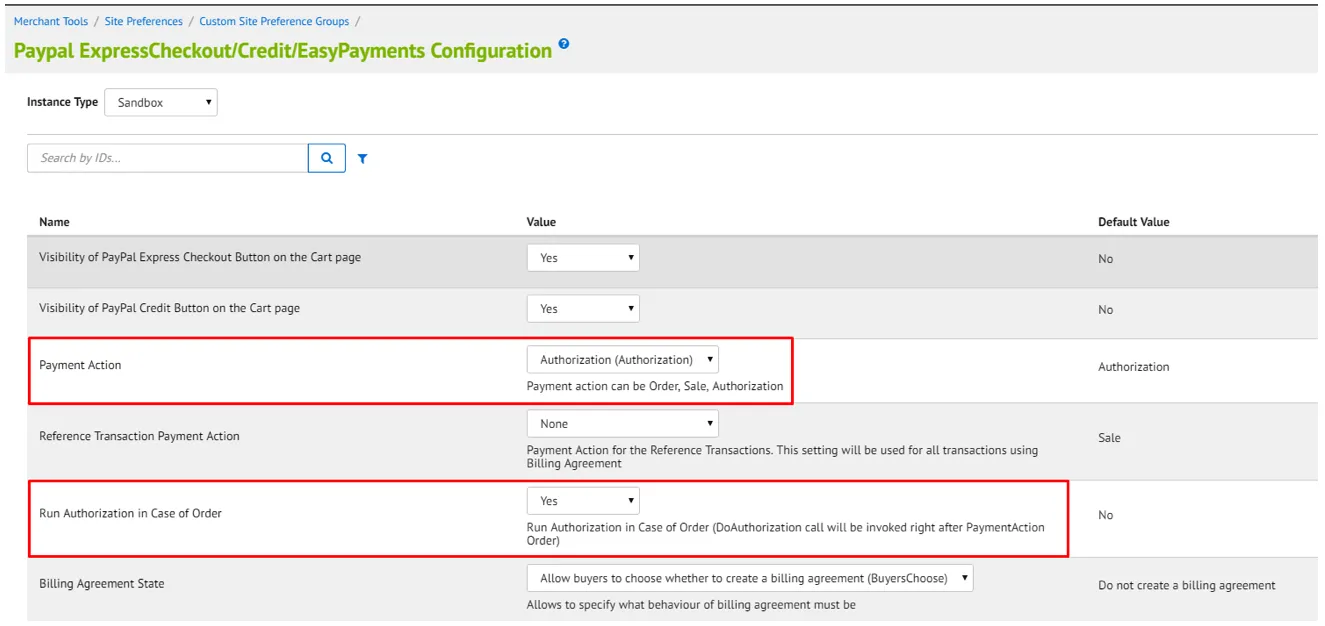
The Express Checkout should include Authorization before Forter is called. This can be done by setting the Payment Action to "Authorization" or by setting Run Authorization in case of Order to Yes.
Send SFCC Billing Info
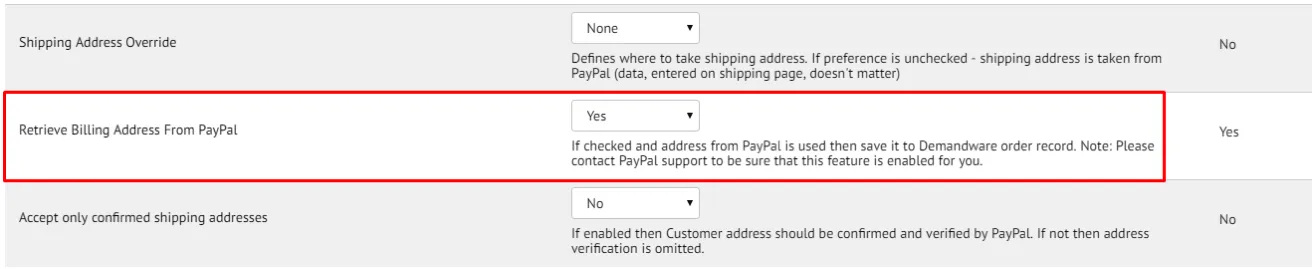
make sure the Paypal cartridge is set to send to Salesforce Commerce Cloud the billing information. Please note this configuration may need external permissions added by Paypal support to your Paypal account.
Configure the PayPal pipelines
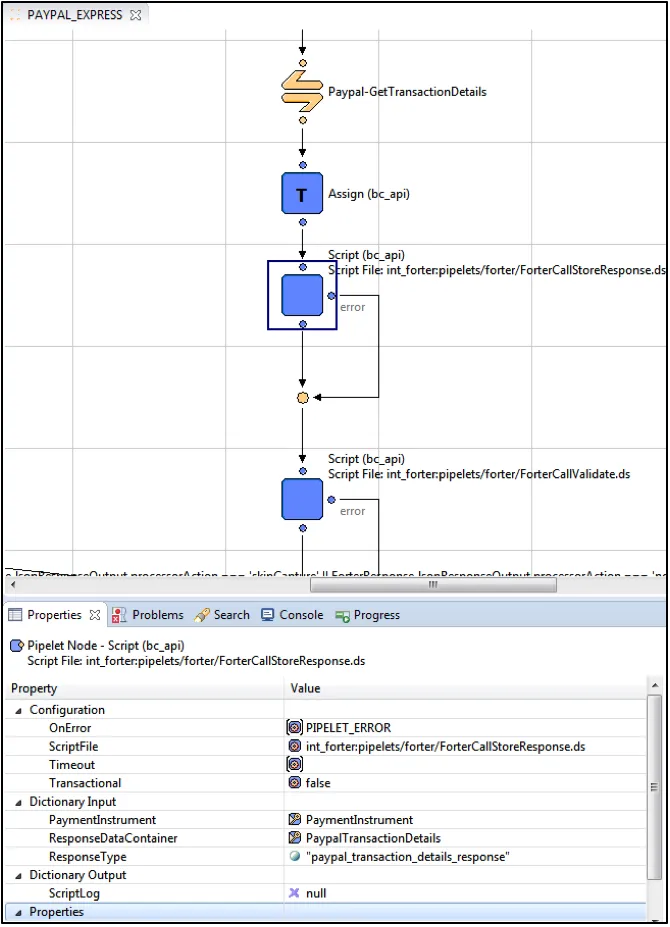
The diagrams below are from the PAYPAL_EXPRESS-Authorize Pipeline. After the CommitTransaction is called Forter requests additional information about the transaction from Paypal by triggering the Paypal-GetTransactionDetails API call. After the details are stored Forter API is called in order to provide a decision on the order.
Review your current Pipelines
The diagrams below are from the PAYPAL_EXPRESS-Authorize Pipeline. After the "CommitTransaction" is called Forter requests additional information about the transaction from Paypal by triggering the Paypal-GetTransactionDetails API call. After the details are stored Forter API is called in order to provide a decision on the order. Based on the Forter Decision and the Forter Cartridge configuration, additional API calls are made to Paypal in order to capture or void the order as needed.
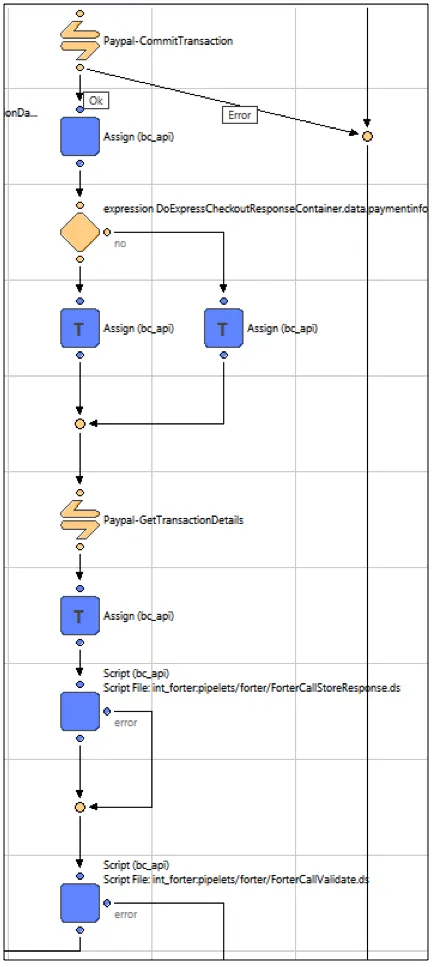
Based on the Forter Decision and the Forter Cartridge configuration, additional API calls are made to Paypal in order to capture or void the order as needed.
1) Assign Node **isAuthorized**
Add an Assign node. Set _From_0_ to true; _To_0_ to isAuthorized.
2) Add a Decision node. Set **Decision Key**
Add a Decision node. Set **Decision Key** to:
DoExpressCheckoutResponseContainer.data.paymentinfo_0_pendingreason === 'order' 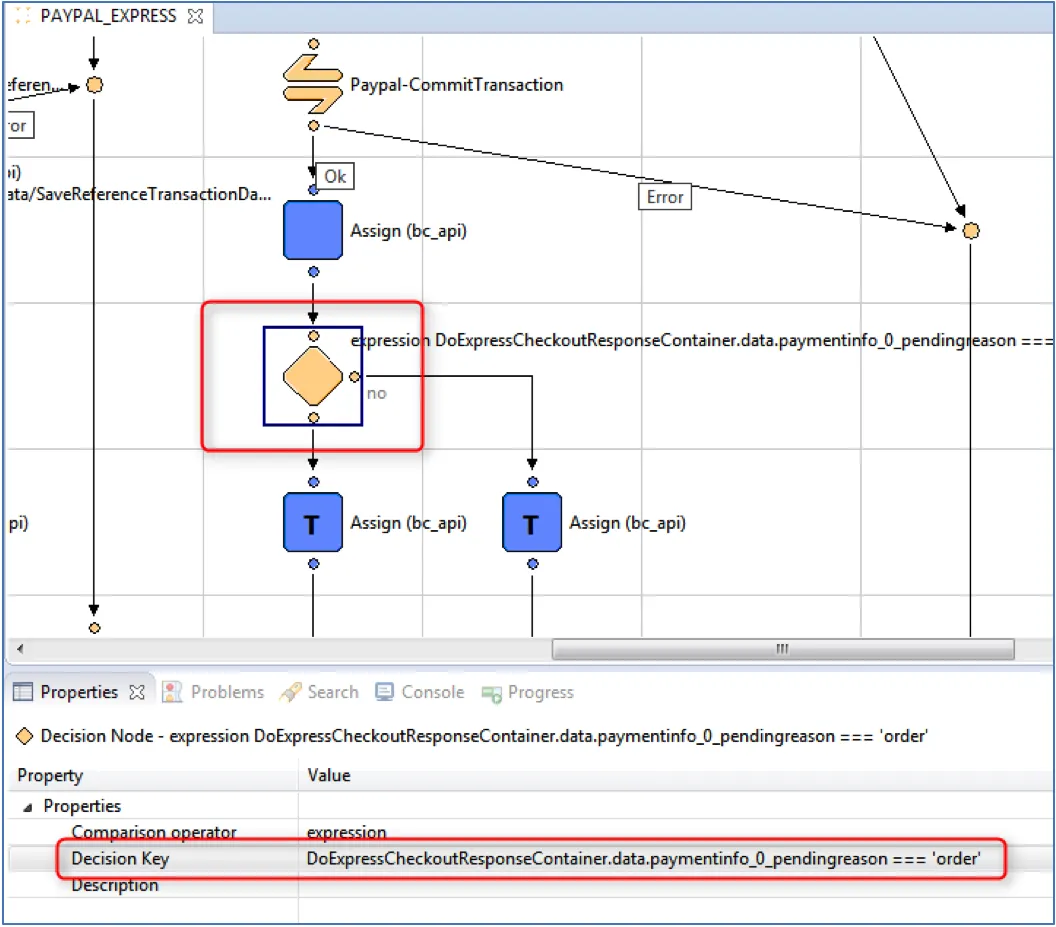
3) Add Assign Node **DoAuthorizationResponseContainer.data.transactionid**’
Add an Assign node. Set From_0 to DoAuthorizationResponseContainer.data.transactionid; To_0 to TransactionID
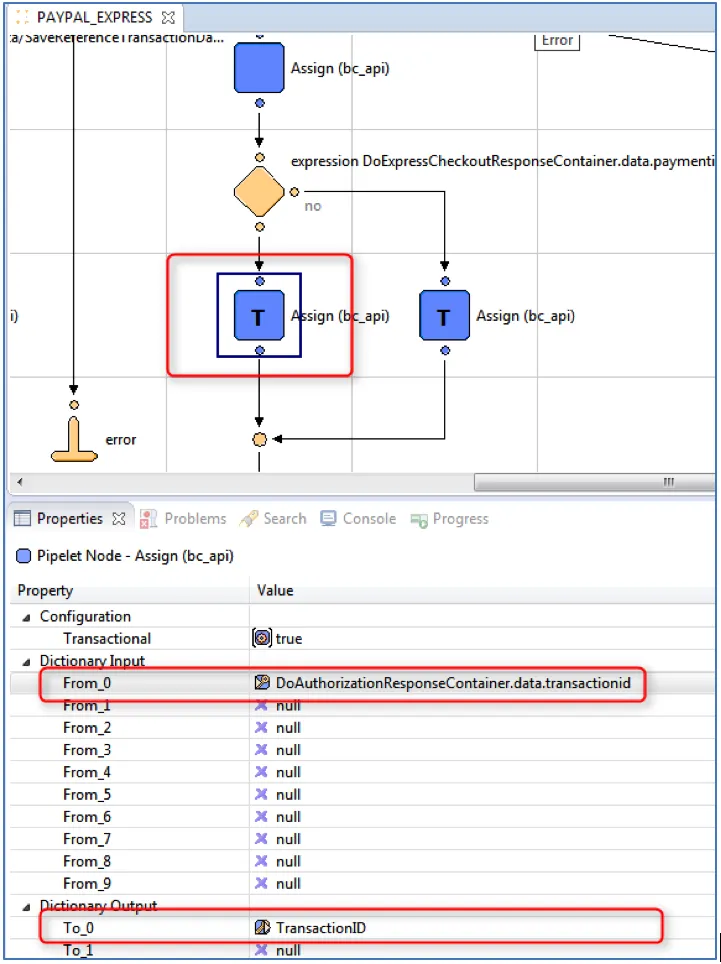
4) Add Assign Node to transactionID
Add an Assign node. Set From_0 to DoExpressCheckoutResponseContainer.data.paymentinfo_0_transactionid; To_0 to TransactionID
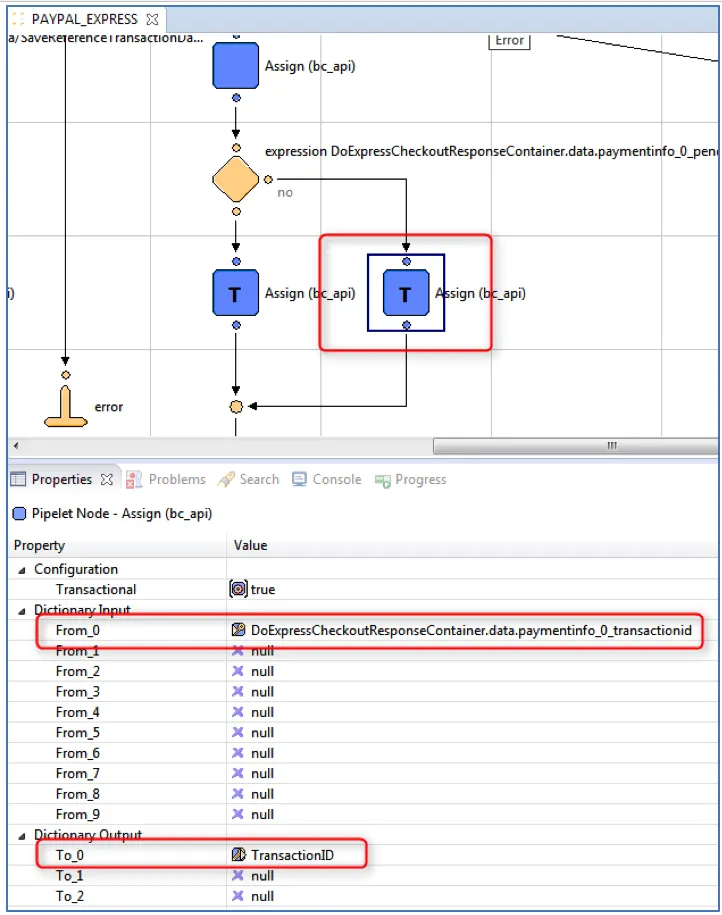
5) Add Call Node Paypal-GetTransactionDetails
Add a Call Node Set Pipeline to Paypal-GetTransactionDetails.
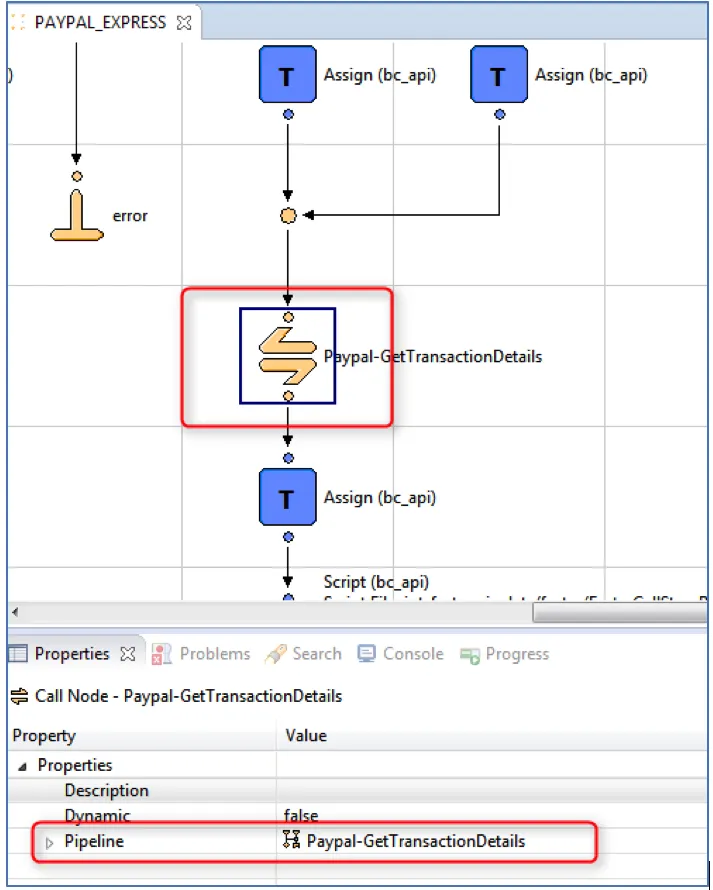
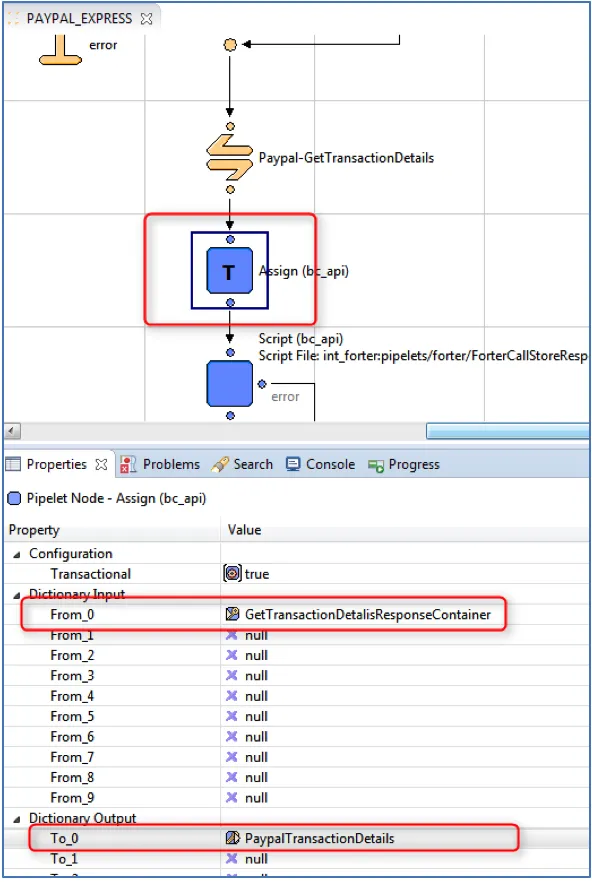
6) Add Assign Node in PaypalTransactionDetails
Add an Assign node. Set From_0 to GetTransactionDetalisResponseContainer; To_0 to PaypalTransactionDetails
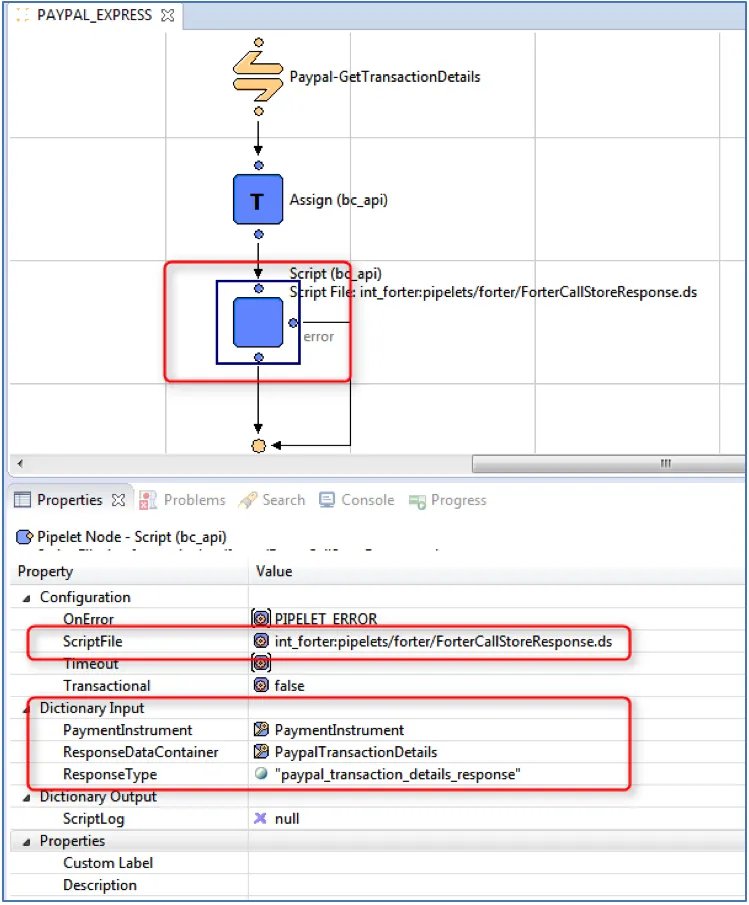
7) Add Script Node to ForterCallStoreResponse.ds
Add a Script node. Set ScriptFile to int_forter:pipelets/forter/ForterCallStoreResponse.ds; PaymentInstrument to PaymentInstrument; ResponseDataContainer to PaypalTransactionDetails; ResponseType to paypal_transaction_details_response.
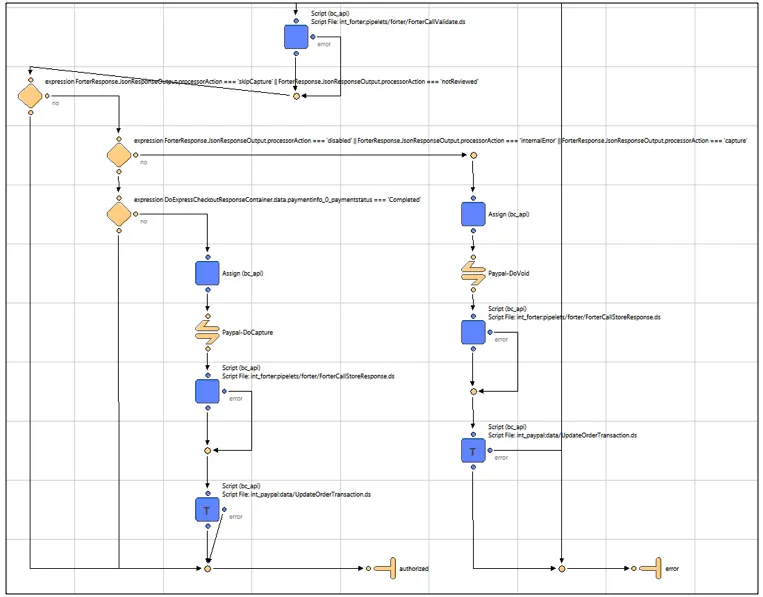
8) Add a script node to ForterCallValidate.ds
Add a Script node. Set ScriptFile to int_forter:pipelets/forter/ForterCallValidate.ds; Order to Order; JsonResponseOutput to ForterResponse; PlaceOrderError to PlaceOrderError.
9) Set Decision Keys
Add a Decision node. Set Decision Key to
ForterResponse.JsonResponseOutput.processorAction === 'skipCapture' || ForterResponse.JsonResponseOutput.processorAction === 'notReviewed'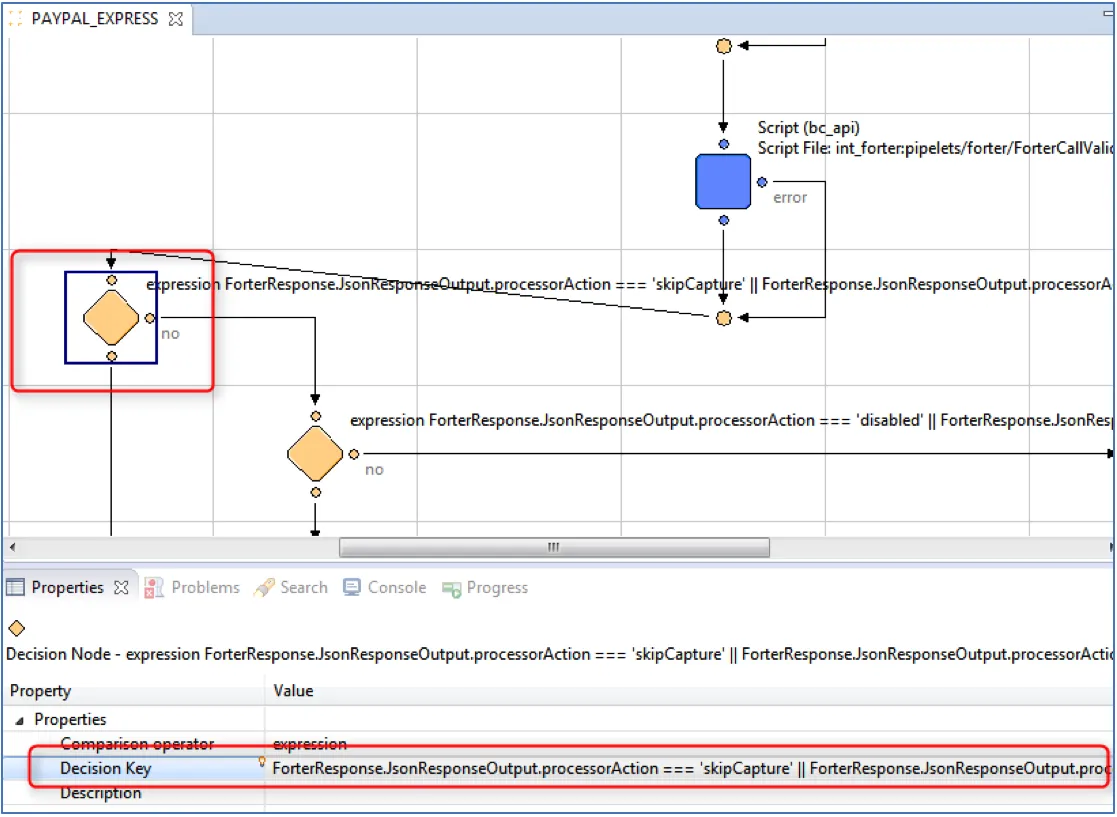
10) Set Additional Decision Keys
Add a Decision node. Set Decision Key to
ForterResponse.JsonResponseOutput.processorAction === 'disabled' || ForterResponse.JsonResponseOutput.processorAction === 'internalError' || ForterResponse.JsonResponseOutput.processorAction === 'capture'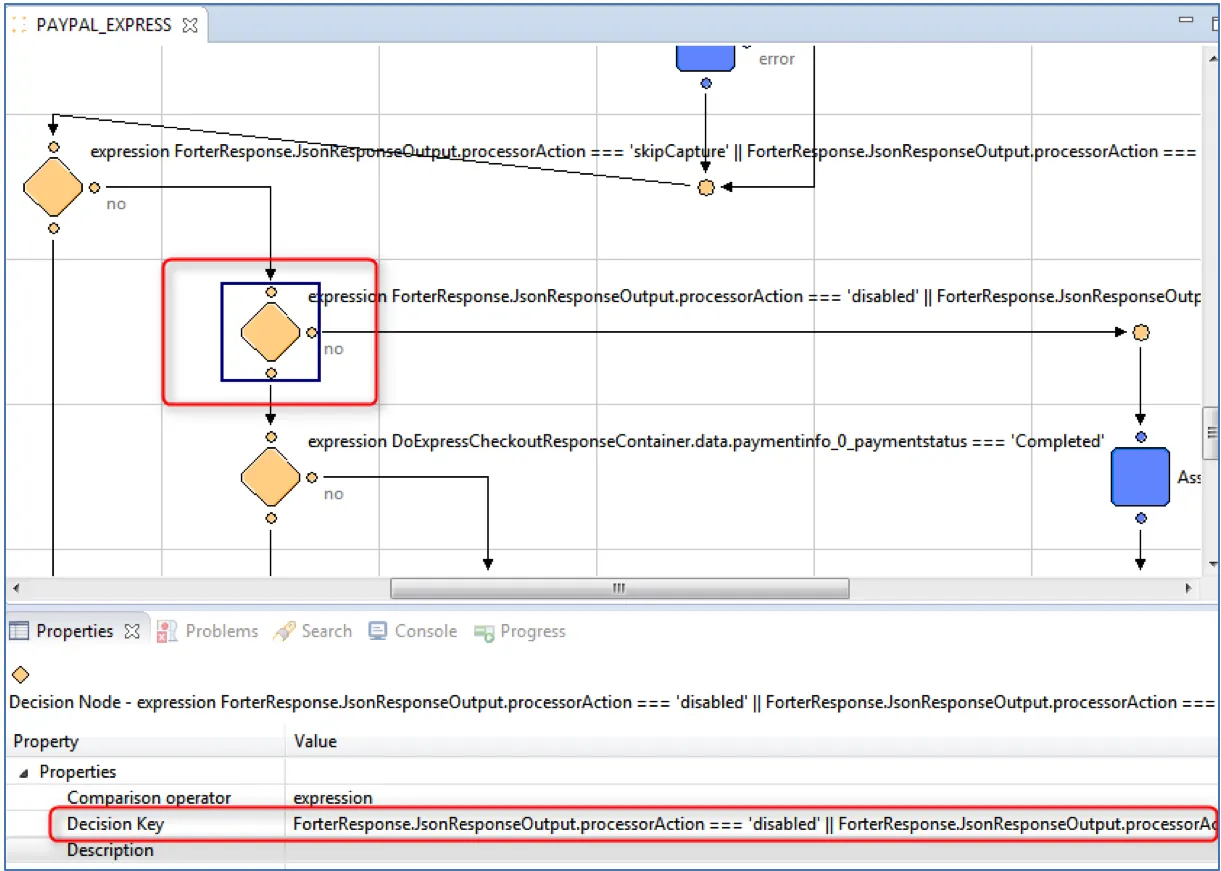
11) Set Payment Status to Completed
Add a Decision node. Set Decision Key to:
DoExpressCheckoutResponseContainer.data.paymentinfo_0_paymentstatus === 'Completed'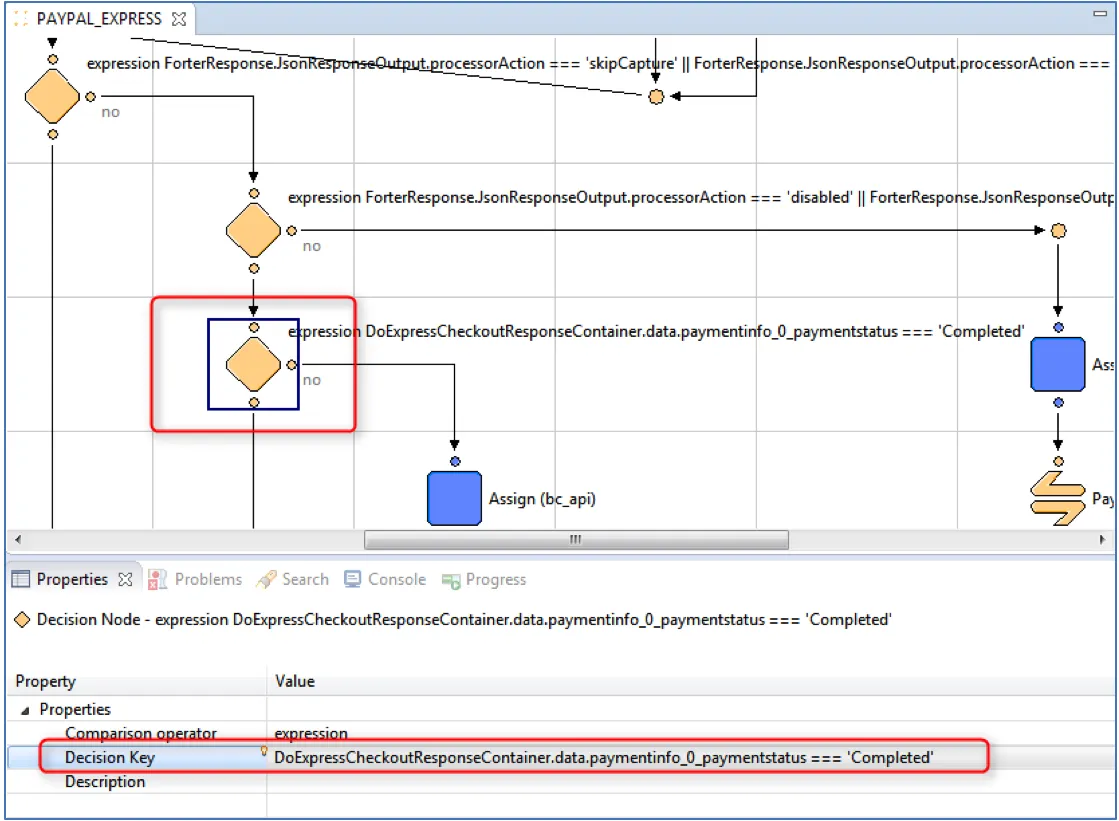
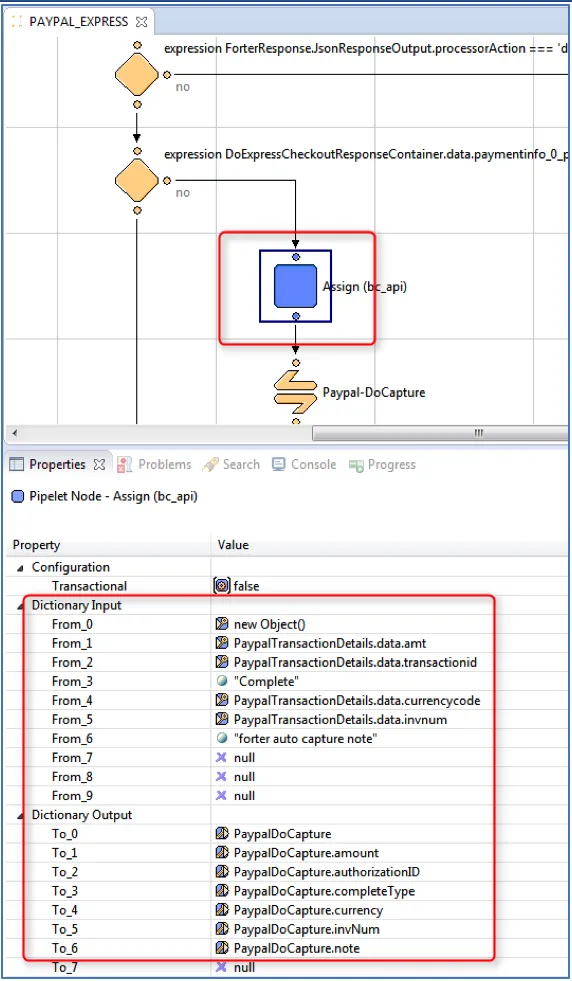
12) Add Assign Node to update payment details
Add an Assign node. Set:
- From_0to new Object();
- From_1 to PaypalTransactionDetails.data.amt;
- From_2 to PaypalTransactionDetails.data.transactionid;
- From_3 to "Complete";
- From_4 to PaypalTransactionDetails.data.currencycode;
- From_5 to PaypalTransactionDetails.data.invnum;
- From_6 to "forter auto capture note";
- To_0 to PaypalDoCapture;
- To_1 to PaypalDoCapture.amount;
- To_2 to PaypalDoCapture.authorizationID;
- To_3 to PaypalDoCapture.completeType;
- To_4 to PaypalDoCapture.currency;
- To_5 to PaypalDoCapture.invNum;
- To_6 to PaypalDoCapture.note;
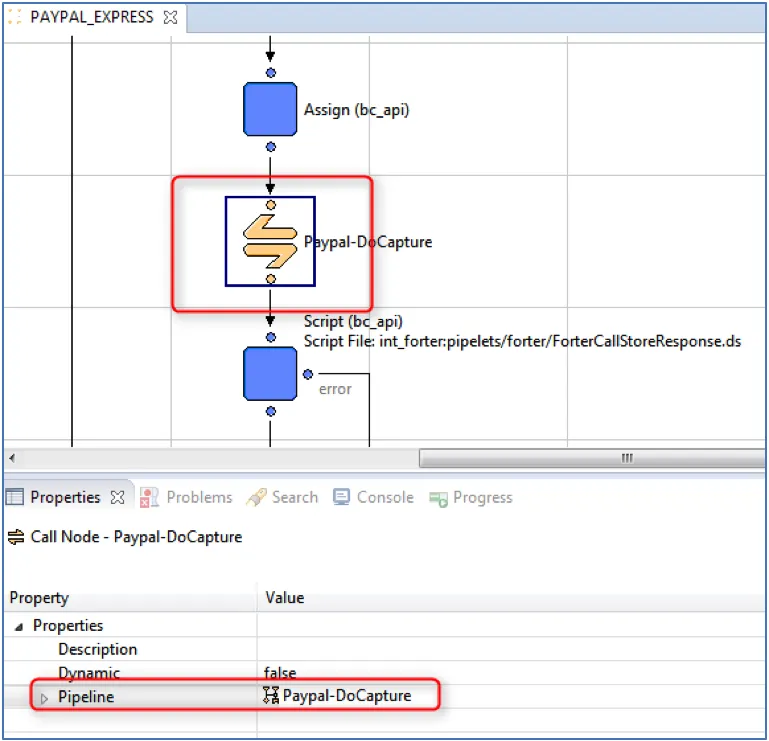
**13) Add a Call node. Set Pipeline to **Paypal-DoCapture
Add a Call node. Set Pipeline to Paypal-DoCapture.
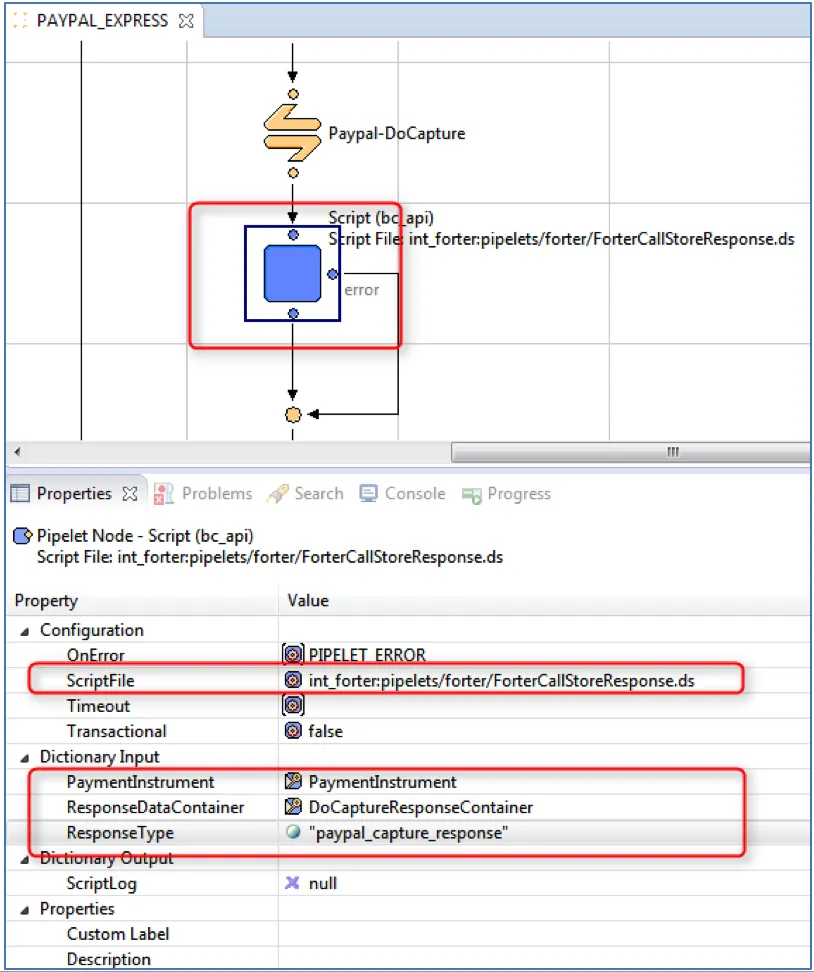
**14) Set ScriptFile to **ForterCallStoreResponse.ds
Add a Script node. Set ScriptFile to int_forter:pipelets/forter/ForterCallStoreResponse.ds; PaymentInstrument to PaymentInstrument; ResponseDataContainer to DoCaptureResponseContainer; ResponseType to paypal_capture_response.
15) Add Script Node to UpdateOrderTransaction.ds
Add a Script node. Set: ScriptFile to int_paypal:data/UpdateOrderTransaction.ds; IsCustomOrder to false; MethodName to "DoCapture"; OrderNo to Order.orderNo; TransactionID to
DoCaptureResponseContainer.data.get('transactionid') || DoCaptureResponseContainer.data.get('authorizationid') || DoCaptureResponseContainer.data.get('refundtransactionid')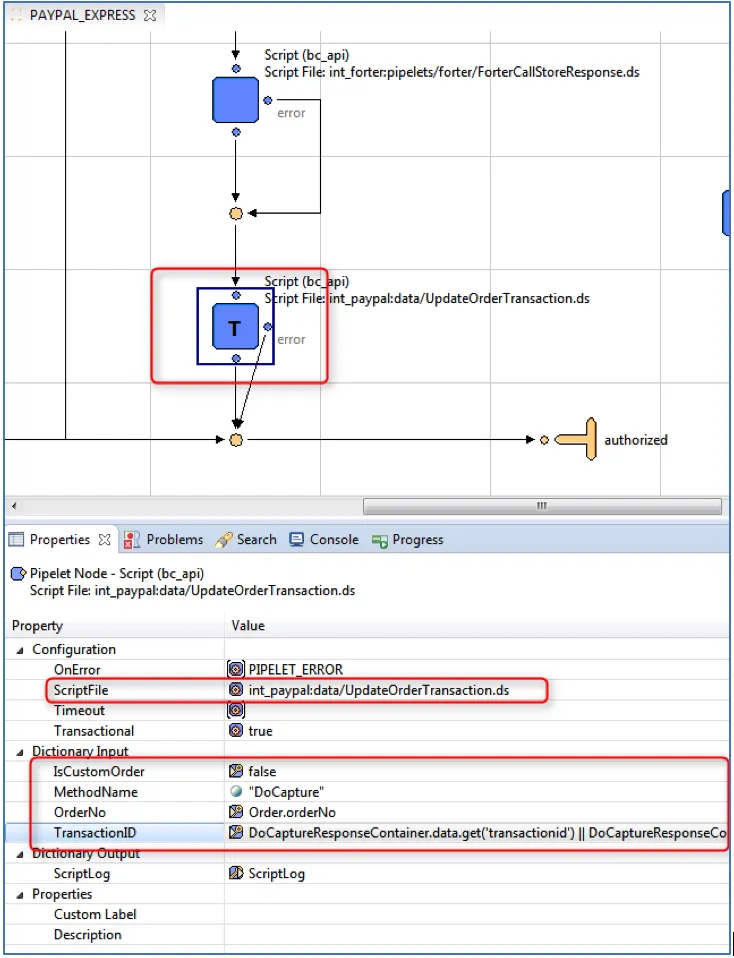
16) Add some more Assign Nodes!
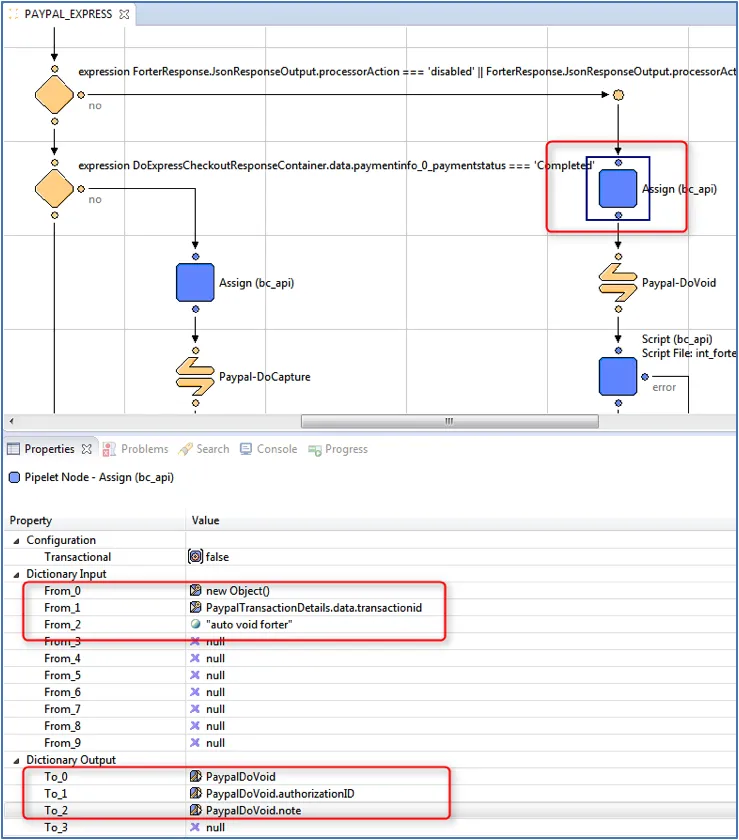
Add an Assign node. Set:
- From_0 to new Object();
- From_1 to PaypalTransactionDetails.data.transactionid
- From_2 to "auto void forter"
- To_0 to PaypalDoVoid;
- To_1 to PaypalDoVoid.authorizationID;
- To_2 to PaypalDoVoid.note;
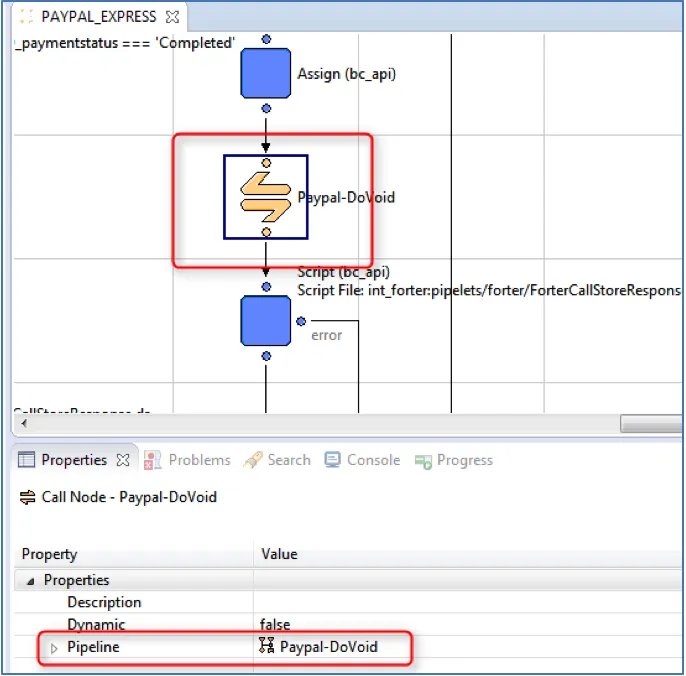
**17) Set Pipeline to **Paypal-DoVoid
Add a Call node. Set Pipeline to Paypal-DoVoid.
18) Update Void Response Pipelets
Add a Script node. Set: ScriptFile to int_forter:pipelets/forter/ForterCallStoreResponse.ds; PaymentInstrument to PaymentInstrument; ResponseDataContainer to DoVoidResponseContainer; ResponseType to "paypal_void_response".
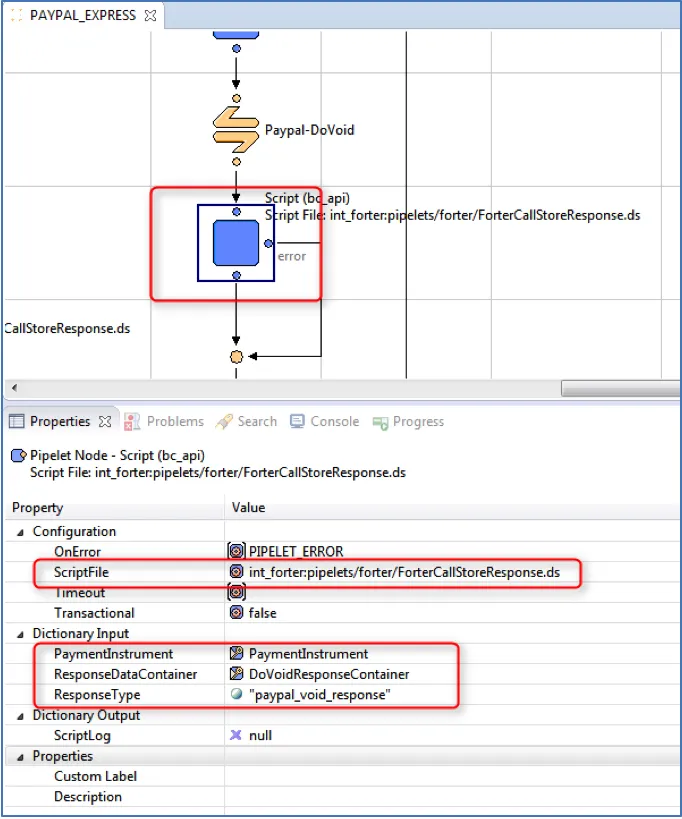
19) Add Script Node to UpdateOrderTransaction.ds
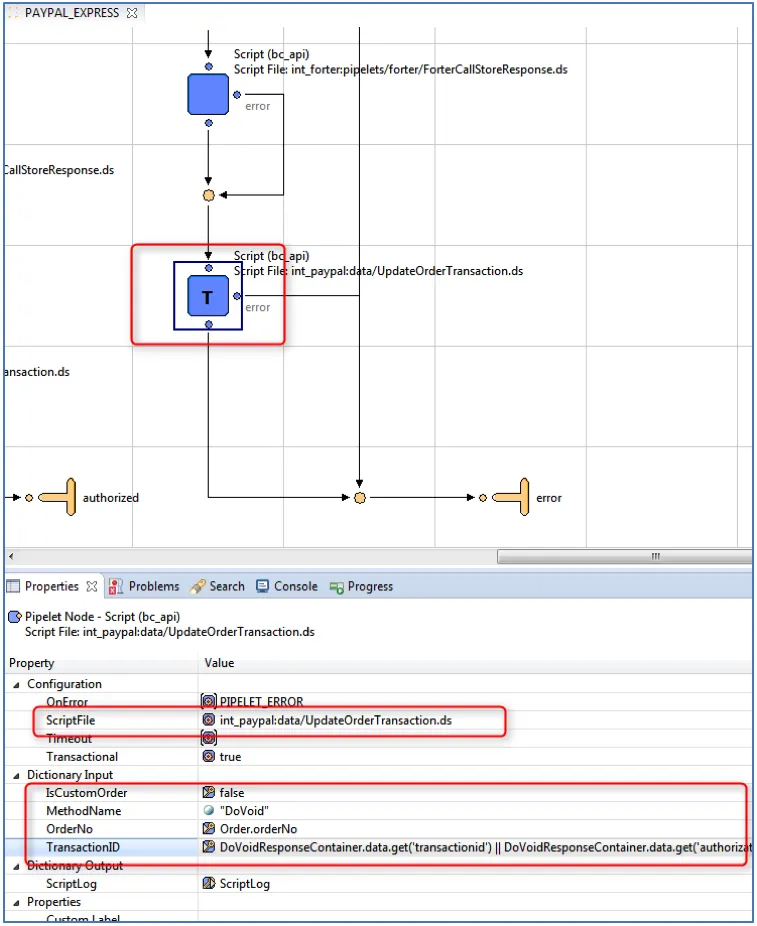
Add a Script node. Set the following:
- ScriptFile to int_paypal:data/UpdateOrderTransaction.ds;
- IsCustomOrder to false;
- MethodName to "DoVoid";
- OrderNo to `Order.orderNo’;
- TransactionID to DoVoidResponseContainer.data.get('transactionid') || DoVoidResponseContainer.data.get('authorizationid') || DoVoidResponseContainer.data.get('refundtransactionid').
The Forter cartridge has built-in functionality for saving the PayPal API responses – the transaction details, capture, void, authorization and expresscheckout responses. The data is stored as a JSON string in the custom attribute of the Order Payment Instrument object. Each response is saved to its dedicated custom attribute. The recommended type for these custom attributes is Text since in some cases the response is over 4K characters. In order to save the PayPal response a script node must be added in the place where the required data exists.
For example PayPal transaction details may be saved right after a call to PaypPal-GetTransactionDetails and passed into the int_forter:pipelets/forter/ForterCallStoreResponse.ds script. In the script Dictionary Input, the “paypal_transaction_details_response” is actually the type of the response custom attribute, PaypalTransactionDetails. This data point is an object that contains information about the current transaction and PaymentInstrument is your current payment instrument.