Split Payments
Split Payments
Overview
Forter defines a split payment order as an order that includes more than one payment method. For instance, if a customer pays for an order partially with gift card and partially with credit card or partially with credit card and partially with
Formatting Split Payments
In Forter's API schema, payment is formatted as an ARRAY that can accept multiple payment objects.
In cases of multiple payments, you should push each payment method into the payment array. The nesting within the payment array should look like the following for split payment orders:
"payment": [
    {}, // first payment method
    {} // second payment method
]
Where each object represents a different payment method. If the billing details for both payment methods is constant, it only needs to be passed into one of the payment method objects. Below is an example of a split credit card/gift card order.
Formatting split payments in the SFCC cartridge
The specific formatting for split payments can be customized within the Forter Cartridge based on each merchant's existing architecture. For merchants using SFRA or Controllers-based architecture, logic for split payments should be added to the ForterOrder.ds file. Most merchants add logic to iterate over the paymentInstrument within the ForterOrder() function to identify all payment methods used in an individual transaction and push each method into the payment array.
ForterOrder.ds file with logic for split payments (CyberSource)
** note that this file will need to be customized in accordance with your existing checkout flow, gateway authorization response and accepted payment methods.
Sample ForterOrder.ds function
function ForterOrder(args) {

    var log          = new ForterLogger("ForterOrder.ds"),
        order        = args.Order,
        site         = dw.system.Site.getCurrent(),
        paymentInstruments = order.getPaymentInstruments(),
        payment      = null,
        authResponse = null,
        paymentApplePay =  [],
        paymentGC	 = [],
        authResponseGC = [],
        shipment     = null;

    for (var paymentInstrument in paymentInstruments) {
        if (paymentInstrument.paymentMethod == 'CREDIT_CARD') {  //TODO: adjust to the existing payment instruments
            payment      = paymentInstrument;
            if(!empty(paymentInstrument.AuthData)) {
            authResponse = new XML(paymentInstrument.AuthData);
            }
            else if(!empty(paymentInstrument.cyberSourceTransactionBody)){
				authResponse = new XML(paymentInstrument.cyberSourceTransactionBody[0]);
            }

        } else if (paymentInstrument.paymentMethod == 'PayPal' || paymentInstrument.paymentMethod == 'BML') {  //TODO: adjust to the existing payment instruments
            payment      = paymentInstrument;
            authResponse = paymentInstrument;
        } else if (paymentInstrument.paymentMethod == 'ApplePay' ||
        paymentInstrument.paymentMethod == 'AmazonPay') {
            payment = paymentInstrument;
            if (!empty(paymentInstrument.AuthData)) {
                authResponse = new XML (paymentInstrument.AuthData)
            }
        }
        else if (paymentInstrument.paymentMethod == 'GIFT_CERTIFICATE') { // optional if this is an accepted a  method in your store
            //paymentGC   = paymentInstrument;
            paymentGC.push(paymentInstrument);
            if(!empty(paymentInstrument.custom.cayanTransactionItems)) {
            	authResponseGC.push(paymentInstrument.custom.cayanTransactionItems[0]);
            } else {
            	authResponseGC.push(paymentInstrument);
            }
        }
    }
}
Example payment array with split payment
{
"orderId":"123-abc-de45"
 "payment": [ // payment array
   { // first payment object
     "creditCard": {
         "nameOnCard": "Or Paul"
         "bin": "424242",
         "lastFourDigits": "1111"
         "countryOfIssuance": "US",
         "cardType": "credit",
         "expirationMonth": "10",
         "expirationYear": "2025",
         "verificationResults": {
             "authorizationCode": "A",
             "avsFullResult": "Y",
             "cvvResult": "M",
             "processorResponseCode": "1683V2"
             "processorResponseText": "Authorized"
         }
     },
     "billingDetails": {
        "personalDetails": {
            "fullName": "Or Paul",
            "email": "[email protected]"
        },
        "phone": [],
        "address": {
            "zip": "90043",
            "address1": "123 17th St",
            "city": "Santa Monica",
            "region": "CA",
            "country": "US"
        }
     },
     "amount": {
        "currency": "EUR",
        "amountLocalCurrency": "90.00",
        "amountUSD": "100.00"
     }
   },
   { // second payment object
     "giftCard": {
       "merchnantPaymentId": "eab12-ba9a-367",
       "value": {
           "amountUSD": "25.00"
       }
     },
     "amount": {
       "amountUSD": "25.00"
     }
   }
 ]
}
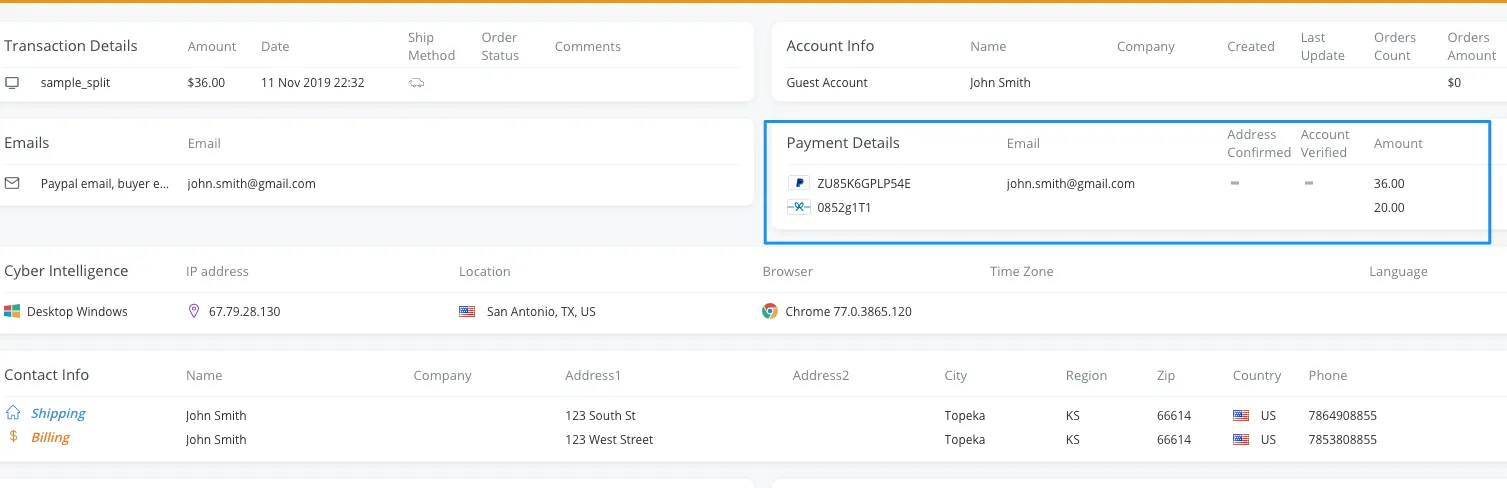
Displaying Split Orders
If the payment method objects are not nested correctly within the payment array, the additional payment methods may not properly display in the portal's detailed transaction view. This does not mean that the order was not accurately decisioned by Forter's machine learning models. However, for optimal transparency and the most accurate data and reporting, we highly recommend that split orders adhere to the correct formatting.