SFRA
SFRA Pre-Auth Integration
The Instructions below should be used for a pre-authorization Forter integration for all storefronts using the SFRA version of the SFCC storefront.
Update your CheckoutServices.js file
Go to the CheckoutServices.js file in your Forter Cartridge. The exact path to this file is: Cartridges > int_forter_sfra > cartridge > controllers > CheckoutService.js.
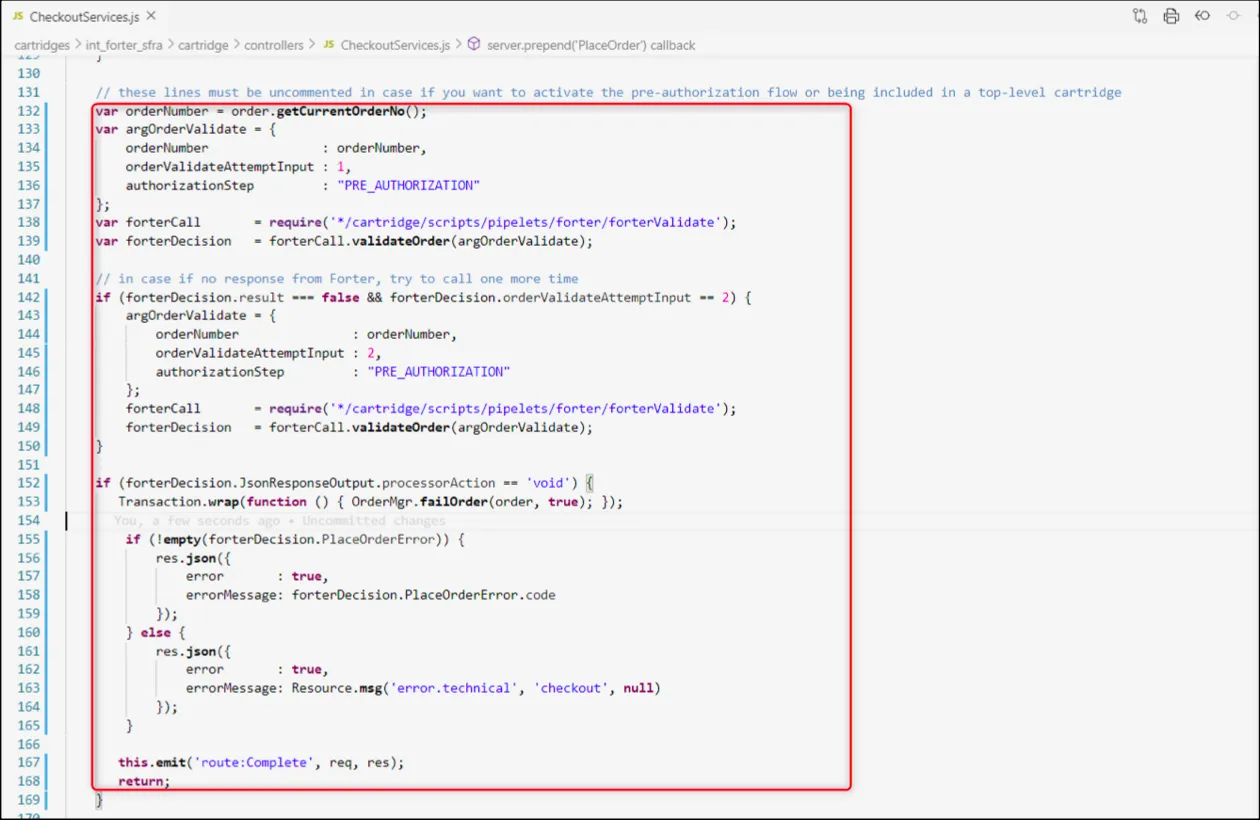
Open this file and uncomment the following code AFTER the var order = COHelpers.createOrder(currentBasket); function and BEFORE the var handlePaymentResult = COHelpers.handlePayments(order, order.orderNo); function in the file.
    var orderNumber = order.getCurrentOrderNo(); var argOrderValidate = {
        orderNumber : orderNumber,
        orderValidateAttemptInput : 1,
        authorizationStep: “PRE_AUTHORIZATION”
    },

    forterCall = require(‘*/cartridge/scripts/pipelets/forter/forterValidate’),
    forterDecision = forterCall.validateOrder(argOrderValidate);

    // in case if no response from Forter, try to call one more time
    if (forterDecision.result === false && forterDecision.orderValidateAttemptInput == 2) {
        var argOrderValidate = {
            orderNumber : orderNumber, orderValidateAttemptInput : 2,
            authorizationStep: “PRE_AUTHORIZATION”
        },
        forterCall = require(‘*/cartridge/scripts/pipelets/forter/forterValidate’),
        forterDecision = forterCall.validateOrder(argOrderValidate);
    }
    if (forterDecision.JsonResponseOutput.processorAction == ‘void’) {
        Transaction.wrap(function () { OrderMgr.failOrder(order, true); });
        if (!empty(forterDecision.PlaceOrderError)) {
            res.json({
                error : true,
                errorMessage : forterDecision.PlaceOrderError.code
            });
        } else {
            res.json({
                error : true,
                errorMessage : Resource.msg(‘error.technical’, ‘checkout’, null)
            });
        }
    this.emit(‘route:Complete’, req, res);
    return;
    }
The Screenshot and full code CheckoutServices.js file included below show where this additional code should be placed within the CheckoutServices.js file.
Option 1: Pre-Auth AND Post-Auth Decisions
Follow the steps below to receive a decision post-authorization decision from Forter. In this flow, you'll receive a binary approve/decline decision prior to calling your payment gateway AND after receiving an authorization response from your gateway.
1. Include mapping for the Post-Auth Validation Call
After uncommenting the code in the CheckoutServices.js file, you'll need to customize the mapping in the forterOrder.js file (cartridges > int_forter_sfra > cartridge > scripts > lib > forter > dto > forterOrder.js) to include the authorization response from your gateway in the post-auth call to Forter. The exact mapping can be found in the ForterCreditCard(auth, cc) function within the verificationResults object.
Sample forterOrder.js Mapping
    function ForterCreditCard(auth, cc) {
    var processorResponseCode = '';
    var processorResponseText = '';
    var creditCardExpMonth;

    // format the expiration month. from 1 to 01, etc.
    if (cc.creditCardExpirationMonth.toString().length === 1) {
        creditCardExpMonth = '0' + cc.creditCardExpirationMonth.toString();
    } else {
        creditCardExpMonth = cc.creditCardExpirationMonth.toString();
    }

    this.nameOnCard = cc.creditCardHolder;
    this.cardBrand = cc.creditCardType;

    if (cc.creditCardNumber.substring(0, 6).indexOf('*') > -1) {
        this.bin = session.forms.billing.creditCardFields.cardNumber.value.substring(0, 6); // session.forms.billing.paymentMethods.creditCard.number.value.substring(0, 6);
    } else {
        this.bin = cc.creditCardNumber.substring(0, 6);
    }

    this.lastFourDigits = cc.creditCardNumberLastDigits;
    this.expirationMonth = creditCardExpMonth;
    this.expirationYear = cc.creditCardExpirationYear.toString();

    this.verificationResults = {};
    this.verificationResults.avsFullResult = auth ? auth.avsResultCode.toString() : '';     // must be adjusted according to the payment gateway used
    this.verificationResults.cvvResult = auth ? auth.cvvResultCode.toString() : '';         // must be adjusted according to the payment gateway used
    this.verificationResults.authorizationCode = auth ? auth.authCode.toString() : '';      // must be adjusted according to the payment gateway used

    this.paymentGatewayData = {};
    this.paymentGatewayData.gatewayName = 'AUTHORIZE.NET';                  // must be adjusted according to the payment gateway used
    this.paymentGatewayData.gatewayTransactionId = auth ? auth.transId.toString() : ''; // must be adjusted according to the payment gateway used

    if (auth && auth.errors.errorCode.length > 0) {                           // must be adjusted according to the payment gateway used
        processorResponseCode = auth.errors.errorCode.toString();     // must be adjusted according to the payment gateway used
        processorResponseText = auth.errors.errorText.toString();     // must be adjusted according to the payment gateway used
    } else if (auth && auth.messages.code.length > 0) {                       // must be adjusted according to the payment gateway used
        processorResponseCode = auth.messages.code.toString();        // must be adjusted according to the payment gateway used
        processorResponseText = auth.messages.description.toString(); // must be adjusted according to the payment gateway used
    }

    this.verificationResults.processorResponseCode = processorResponseCode;
    this.verificationResults.processorResponseText = processorResponseText;
}
2. Update your Business Manager**
- The additional code that you have added above to your CheckoutServices.js file allows your storefront to send order information to the Forter endpoint BEFORE an authorization call is made to your payment gateway.
- Make update your Forter Business Manager extension** to show a customized error message for this updated Pre-Authorization Flow.
Option 2: Pre-Auth Decisions with Post-Auth Order Status
In this configuration, you'll only receive a Forter decision pre-Auth (prior to calling your payment gateway) and the authorization response from the gateway will be included in a subsequent order status call to Forter.
1. Update the Order Status
The example Authorize.net script below outlines how to update the script that handles credit card processing so that it includes the relevant post-authorization order status call to Forter. Note that the two default order statuses are:
- "PROCESSING" (when the gateway has authorized the payment)
- "CANCELED_BY_MERCHANT" (when the gateway/processor has NOT authorized payment)
The code example below applies to all SFRA and SG pre-auth/status implementations and the full postAuthOrderStatusUpdate() function can be found in forterValidate.js file (cartridges > int_forter_sfra > cartridge > scripts > pipelets > forter > forterValidate.js)
    var argOrderUpdate = {
        orderNumber: orderNumber,
        updateAttempt: 1
    },
    forterCall = require('*/cartridge/scripts/pipelets/forter/forterValidate'),
    forterDecision = forterCall.postAuthOrderStatusUpdate(argOrderUpdate, "PROCESSING");

    if (forterDecision.result === false && forterDecision.updateAttempt == 2) {
        forterDecision.updateAttempt = 2;
        forterCall.postAuthOrderStatusUpdate(argOrderUpdate, "PROCESSING");
    }
2. Customize ForterUpdate.js file
After uncommenting the pre-auth code CheckoutServices.js file, customize the forterUpdate.js file to include your gateway's authorization response in the status call to Forter. The exact path to the forterUpdate.js file is cartridges > int_forter_sfra > cartridge > scripts > lib > forter > dto > forterUpdate.js). Customize the ForterPayment(payment, order) function to map your specific gateway authorization response.
3. Update your Business Manager
The additional code that you have added above to your CheckoutServices.js file allows your storefront to send order information to the Forter endpoint BEFORE an authorization call is made to your payment gateway.
You will also need to update your Forter Business Manager extension to show a customized error message for this updated Pre-Authorization Flow.