Network Uplift (Mastercard IDCI)
The integration grants access to Forter's Fraud Management and Issuer Optimization with Mastercard.
Integration Flow
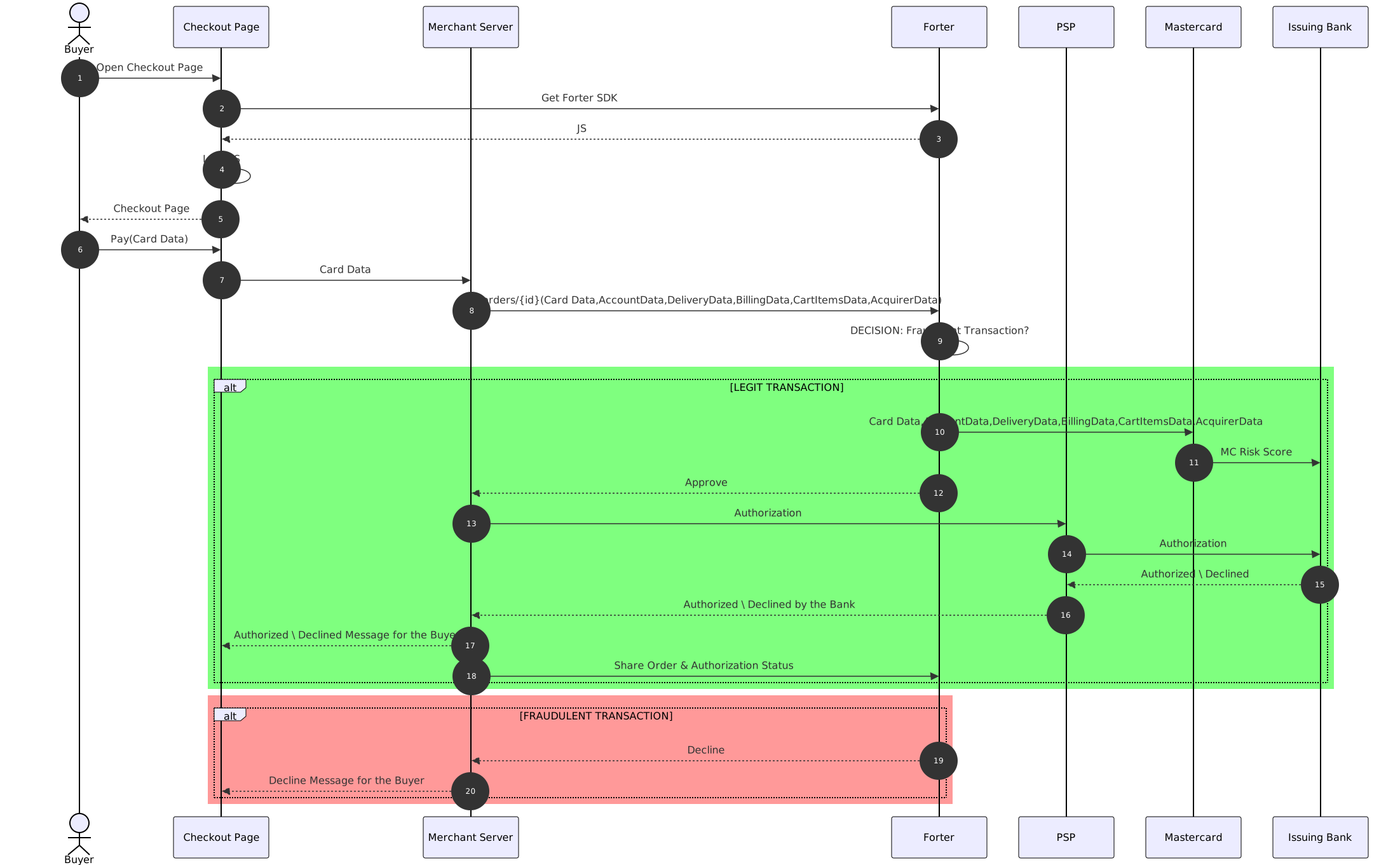
Integration Steps
Confirm Prerequisites
Verify that both Forter's and your PSP's integration requirements are met.
Full PAN
Verify that you can pass the full card number in the Order API. This information is required for Issuer Optimization with Mastercard IDCI.
If you have vaulted cards and the full card number is not exposed on the checkout page, please check with your Tokenization vendor regarding the availability of a Detokenization Proxy service. This service enables you to make a request to a 3rd party (such as Forter Order API) with a Token included in the request. The request is then routed through the proxy, where the token is replaced with the corresponding card data.
Gateway , Processor and Acquirer Data
Verify that you can pass all the details about the expected Authorization process in the Order API:
Gateway Data Name (e.g Braintree)
Processor Data Name (e.g Chase Paymentech)
Acquirer Data Acquirer Name (e.g Barclays) Acquirer BIN Acquirer Merchant Id Acquirer Merchant Name Merchant Category Code Merchant Country Code AcquirerCountry
Note that it in some cases the GW, Acquirer and Processor services are provided by the same company.
Follow the instructions for front-end integration for Fraud Management, including installing Mobile SDKs on your mobile applications.
Send Order API Request
As with the Checkout Integration for Fraud Management, send Forter the complete order details in the Order API to get real-time fraud decisions along with the issuer optimization for Mastercard. The request should be sent before calling the payment gateway to authorize funds (pre-auth flow). The full request and response data can be found in our Order API reference documentation.
Note that full card data is required for Issuer Optimization with Mastercard.
Handle Order API Response
Outcome | Call to Action | Order Response Fields |
|---|---|---|
Forter Approved Transaction is approved by Forter | Authorize | > "forterDecision": "APPROVE" To simulate this response, use [email protected] in the accountOwner object in the Order API request. |
Forter Approved & Data Only was executed Transaction is approved by Forter and has data only recommendation | Authorize | > "forterDecision": "APPROVE", "verificationMethod": {"status": "DATA_ONLY", ...} To simulate this response, use [email protected] in the accountOwner object in the Order API request. |
Forter Declined Transaction is declined by Forter | Do not Authorize | > "forterDecision": "DECLINE" To simulate this response, use [email protected] in the accountOwner object in the Order API request. |
Forter Did Not Review Transaction was not reviewed for a fraud decision | Act according to policy prior to Forter integration | > "forterDecision": "NOT REVIEWED" To simulate this response, use [email protected] in the accountOwner object in the Order API request. |
As you receive payment authentication updates, including 3DS results, and the order fulfillment status changes, it's important to keep Forter notified so that this information can be used in future decisions.
We strongly recommend using a webhook to send notifications about payment authorization and disputes if your PSP is supported.
Notifying Forter of disputes (also called claims, chargebacks, or fraud alerts) is extremely important because it enables Forter's system to learn and continually improve future decisions, tailoring our system to your company's needs. You can send these updates to Forter via a webhook from your PSP or via Forter's Dispute API endpoint.