一般的なエラー
一般的なエラー
以下は、一般的なSFCCカートリッジエラーのリストと、コードベース内の各エラーを解決するための推奨事項です。
レート制限を超えました
エラー例
'An error occured in client "demandware" on site TEST - Physical Goods'
{
 "orderID": "00000705",
 "exception": {
   "message": "",
   "debugInfo": "Rate Limit Exceeded"
 }
}
これは何を意味しますか?
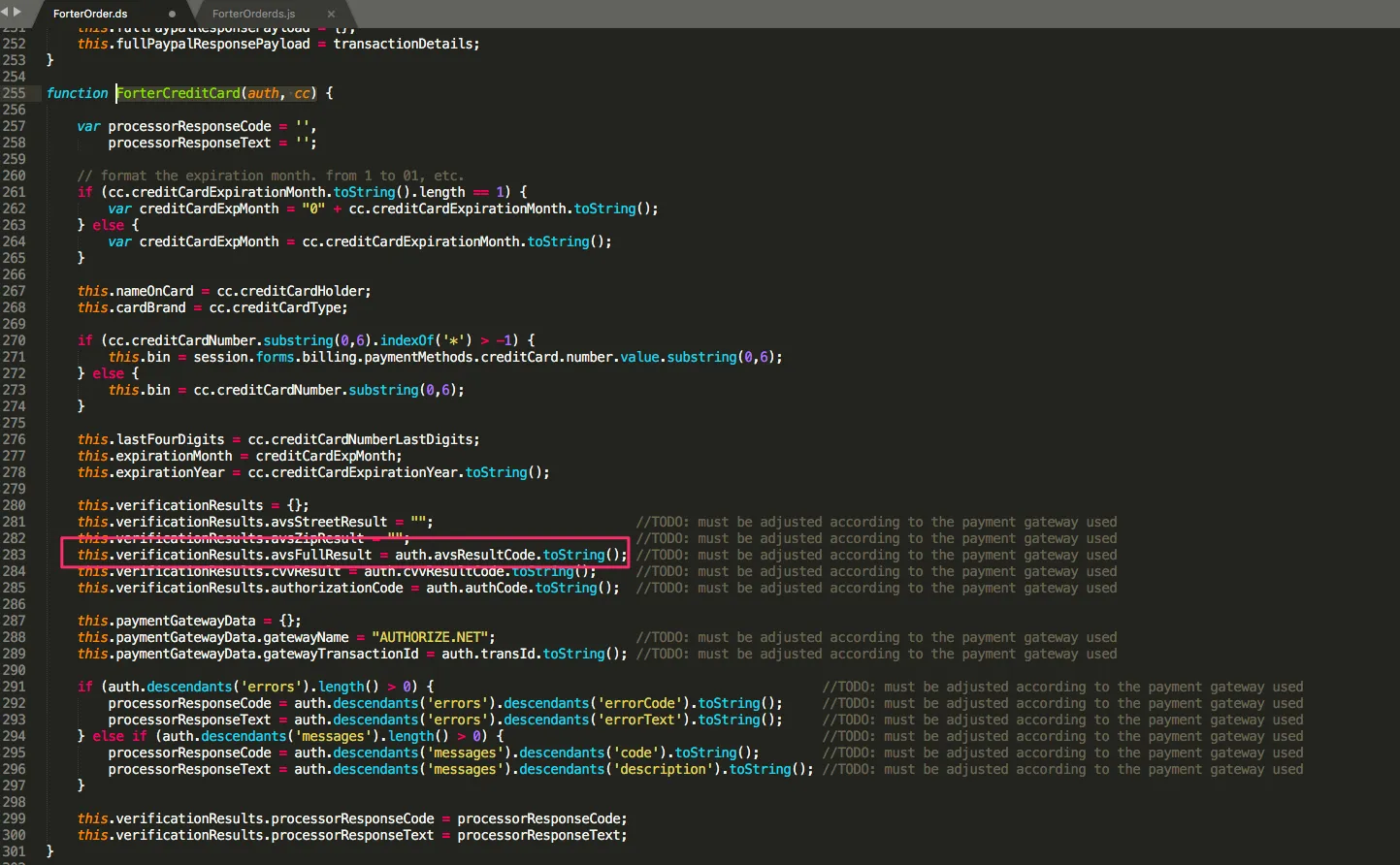
同じ時間内に(同じ注文に対して)呼び出しが多すぎました。レート制限はカートリッジ内で更新する必要があります。次に進んでください: 管理 > 操作 > サービス > サービスプロファイル > forter.prof - 詳細 そして「最大レート制限呼び出し」の値を変更してください(その後、値を2倍にします)
Http接続タイムアウト
エラー例
{
"message": "api.forter-secure.com:443 failed to respond",
"debugInfo": "NoHttpResponseException:api.forter-secure.com:443 failed to respond"
}
これは何を意味しますか?
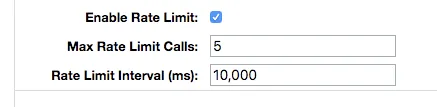
これは、バンドの長さまたは接続タイムアウトを制限することによって引き起こされます。接続タイムアウトを増やすことをお勧めします。接続タイムアウトを増やすには、ビジネスマネージャーにログインし、次の場所に移動します: Administration > Operations > Services > Service Profiles を選択します。Profiles タブで、forter.prof
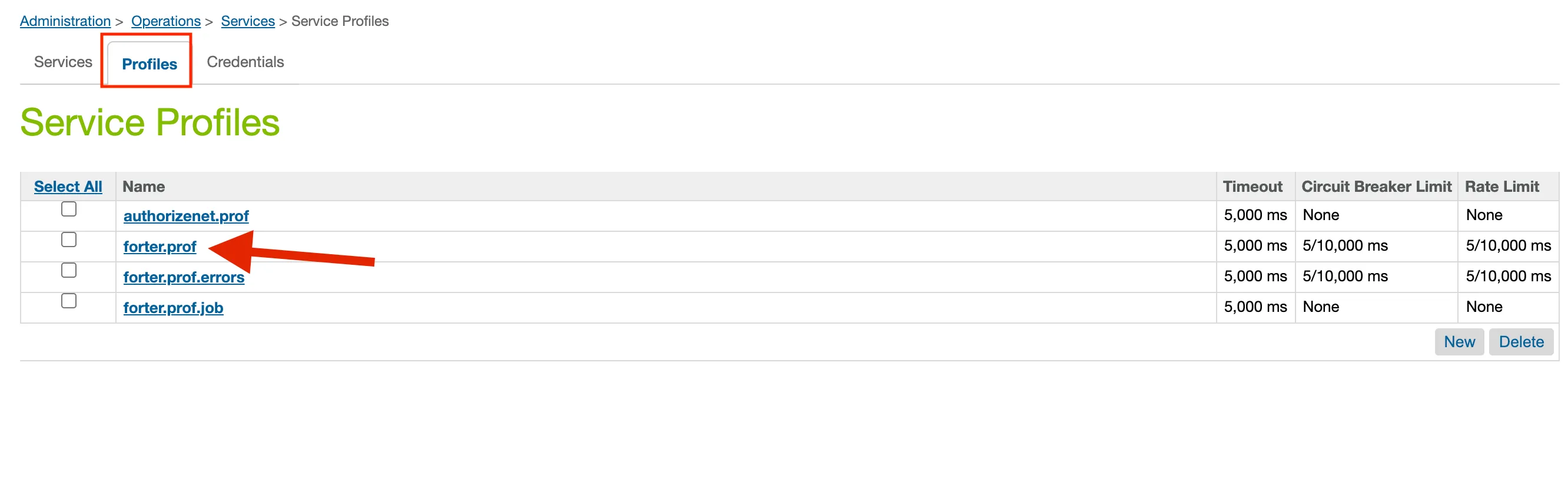
「forter.prof」ページには、「接続タイムアウト(ms)」というフィールドが表示され、タイムアウトを増やすことができます。
不明な動的プロパティ
エラー
'An error occurred in client "demandware" on site TEST - Physical Goods'
{
 "orderID": "00000307",
 "exception": {
   "message": {
     "message": "Unknown dynamic property 'authorize_net_authorization' for class 'class dw.object.ExtensibleObject$ExtensibleObjectAttributes'",
     "fileName": "int_forter/cartridge/scripts/lib/forter/dto/ForterOrder.ds",
     "lineNumber": 21,
     "name": "ReferenceError",
     "stack": "\tat int_forter/cartridge/scripts/lib/forter/dto/ForterOrder.ds:21 (ForterOrder)\n\tat int_forter/cartridge/controllers/ForterValidate.js:39 (validateOrder)\n\tat int_forter/cartridge/scripts/guard.js:149 (anonymous)\n\tat int_forter:pipelets/forter/ForterCallValidate.ds:22 (execute)\n",
     "rhinoException": {}
   },
   "debugInfo": ""
 }
}
これは何を意味しますか?
主な問題は、あなたの決済ゲートウェイカートリッジからの認証レスポンスに関係しています。 Forter Order.ds はゲートウェイレスポンスから有効なオブジェクトを受け取っておらず、その結果、私たちはそのオブジェクトを正しくバリデーション(ForterValidation.js)に渡すことができません。
あなたの決済ゲートウェイからの認証レスポンスオブジェクトは、ForterCreditCard()関数で設定できます。ForterOrder.dsファイル内で。 このファイルは、次の場所に移動することで見つけることができます: Cartridges>int_forter>cartridge>scripts>lib>forter>dto>forterOrder.ds Forterカートリッジ内の例の21行目には、あなたの決済ゲートウェイからの認証を参照するauthResponse変数があります。
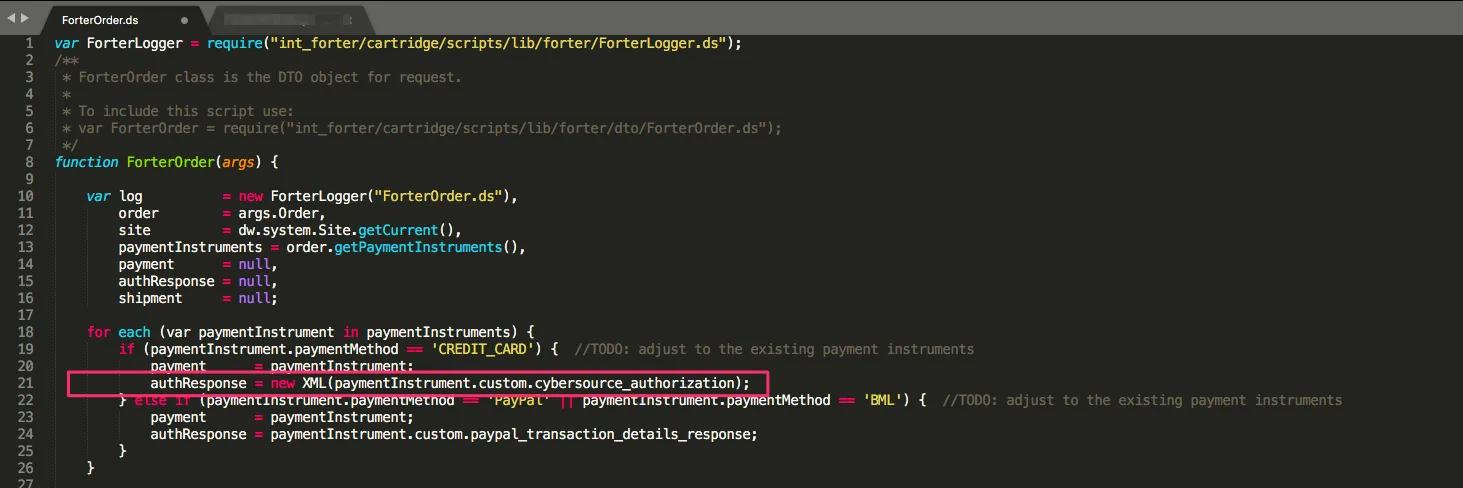
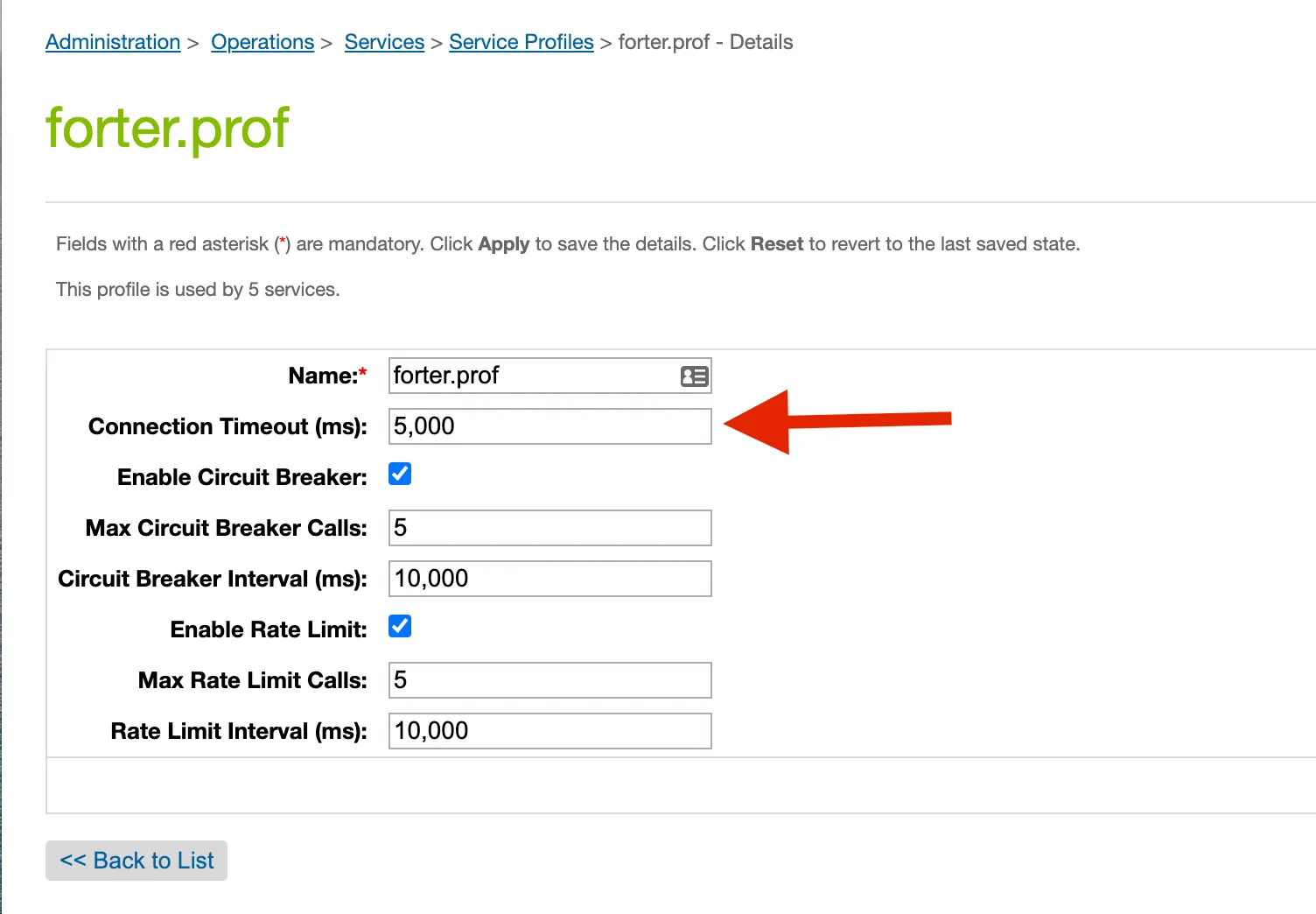
「ForterCreditCard()」関数は、ForterOrder.dsファイルの約255行目から始まるべきで、必要な認証応答データをマッピングできる場所についての注釈を含むべきです。
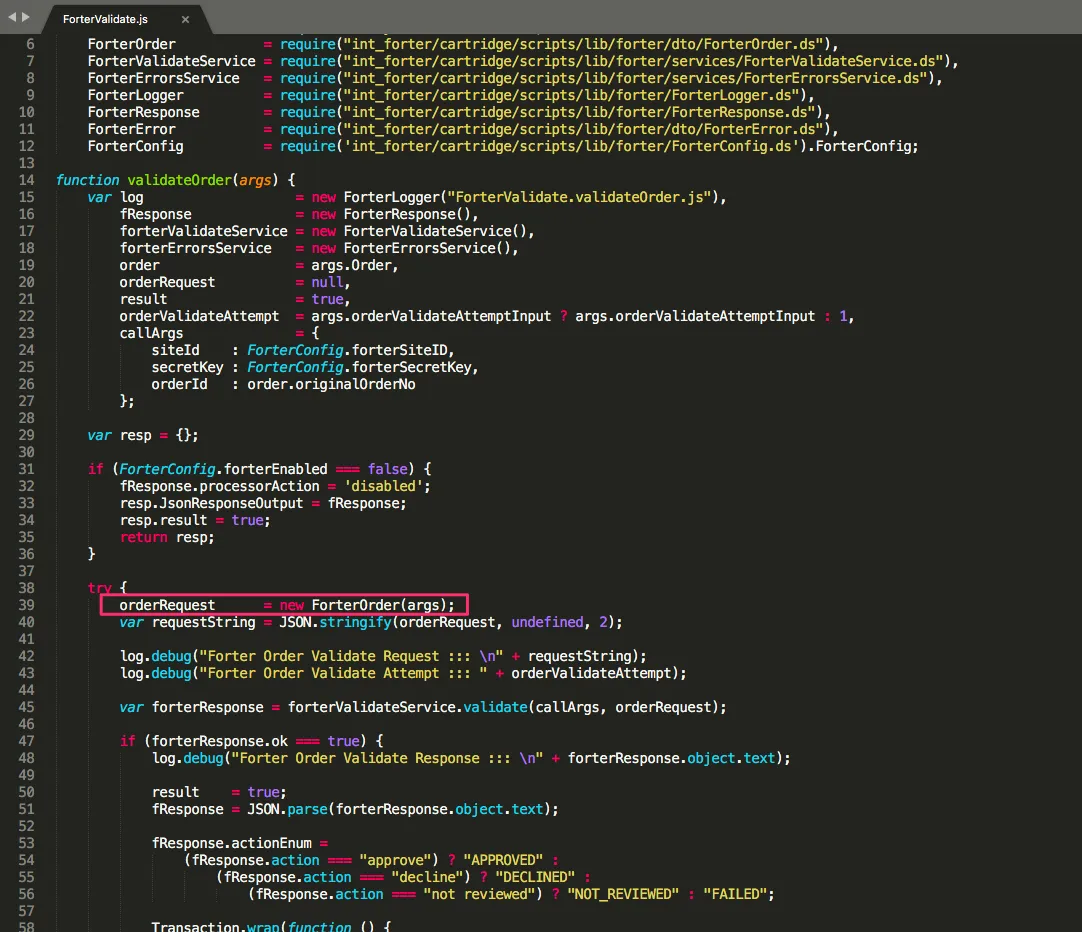
以下のスクリーンショットは、例としてのCyberSource認証応答に基づいてデータがどこにマッピングできるかを示しています。 このマッピングが更新されると、ForterOrder.dsはForterValidation.jsファイルに渡されます。特に39行目を確認し、この変数が作成されていることを確認することをお勧めします。ForterValidation.jsファイルは、次の場所にあります: Cartridges>int_forter>cartridge>controllers>ForterValidate.js
不正なリクエスト
エラー例
'An error occured in client "demandware" on site TEST - Physical Goods'
{
 "orderID": "00002907",
 "exception": {
   "message": "Bad Request",
   "debugInfo": "{\"status\":\"failed\",\"message\":\"Malformed request\",\"errorsCount\":1,\"errors\":[{\"path\":\"#/payment/0/creditCard/bin\",\"message\":\"String does not match pattern [0-9]{6}: xxxxxx\"}]}"
 }
}
これは何を意味しますか?
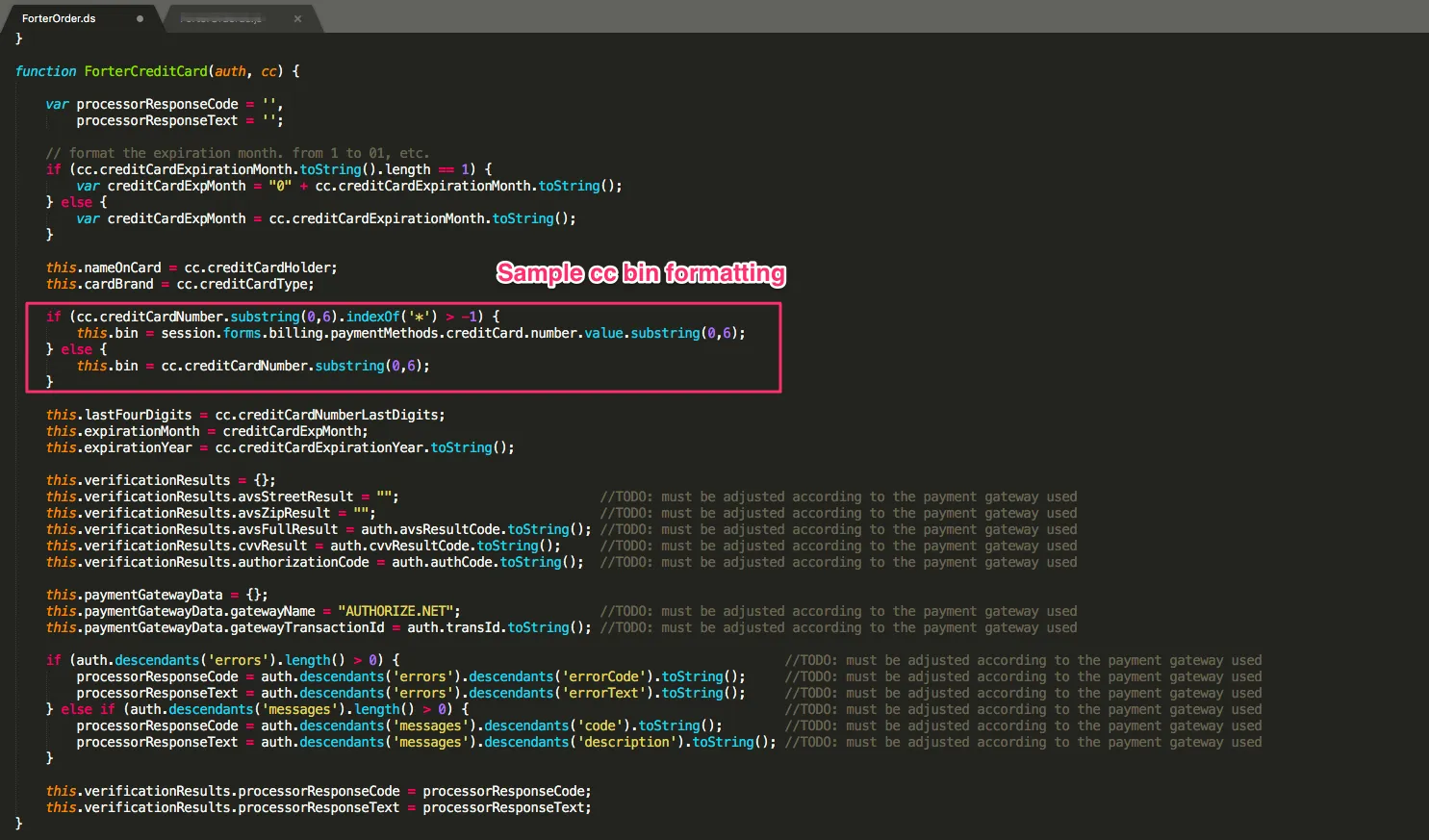
カートリッジ内のスキーマのフォーマット、特にforterOrder.dsは更新する必要があります。Paymentオブジェクト内のクレジットカードのbinの行を更新する必要があります。
理由コードエラー
エラー例
"An error occured in client 'demandware' on site TEST - Physical Goods"
{
 "orderID": "00023119",
 "exception": {
   "message": {
     "message": "Cannot read property \"reasonCode\" from null",
     "fileName": "int_forter/cartridge/scripts/lib/forter/dto/ForterOrder.ds",
     "lineNumber": 295,
     "name": "TypeError",
     "stack": "\tat int_forter/cartridge/scripts/lib/forter/dto/ForterOrder.ds:295 (ForterCreditCard)\n\tat int_forter/cartridge/scripts/lib/forter/dto/ForterOrder.ds:227 (ForterPayment)\n\tat int_forter/cartridge/scripts/lib/forter/dto/ForterOrder.ds:97 (ForterOrder)\n\tat int_forter/cartridge/controllers/ForterValidate.js:39 (validateOrder)\n\tat int_forter/cartridge/scripts/guard.js:149 (anonymous)\n\tat int_forter:pipelets/forter/ForterCallValidate.ds:25 (execute)\n",
     "rhinoException": {}
   },
   "debugInfo": ""
 }
}
これは何を意味しますか?
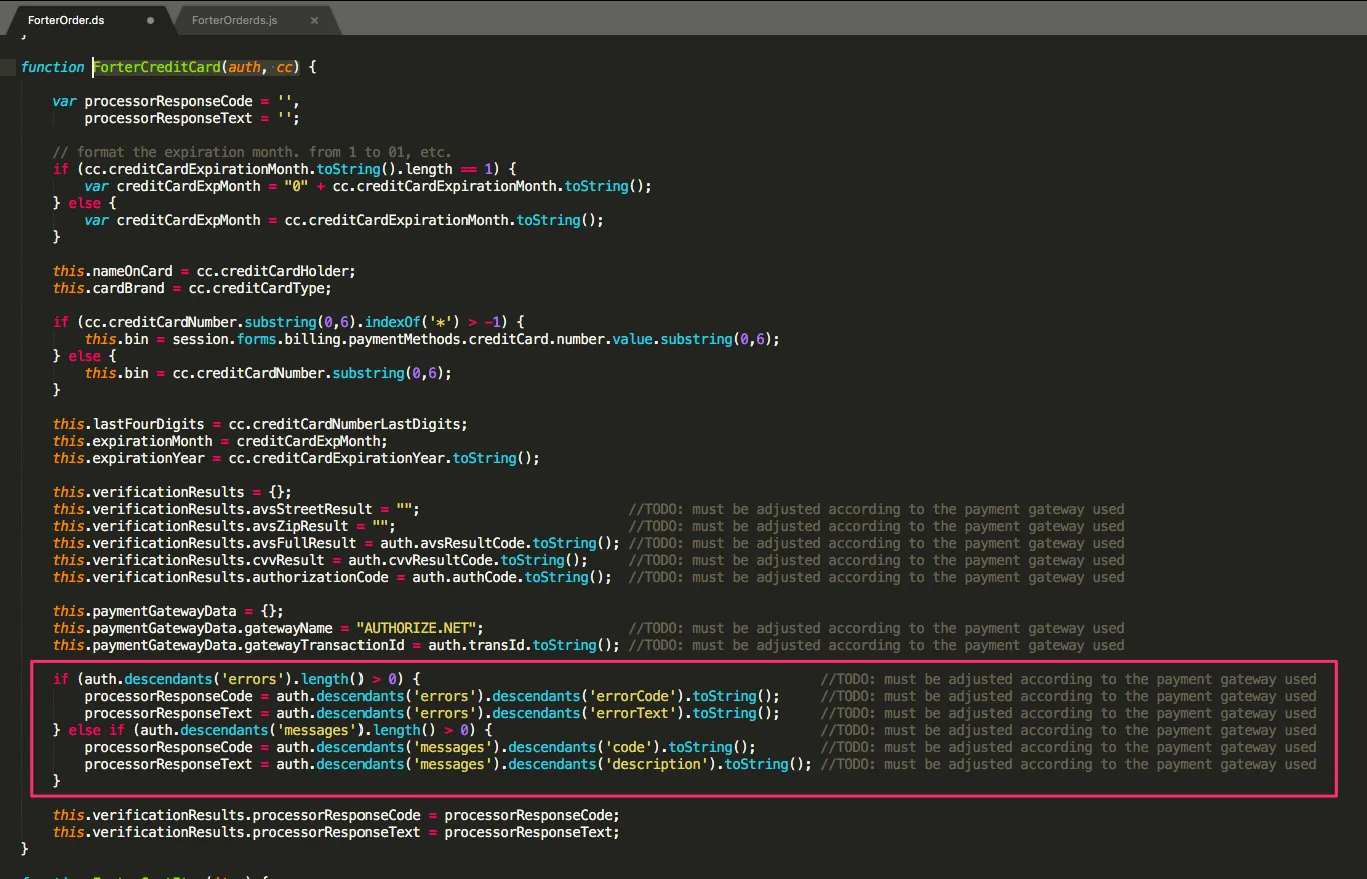
プロセッサのレスポンスコードが適切にマッピングされていないか、creditCardオブジェクトに含まれていません。 この値を更新するには、ForterCreditCard (auth, cc) 関数に移動し、forterOrder.ds ファイル内のprocessorResponseCode フィールドを更新します。auth.decscendants('errors').length() > 1 の if/else ステートメント このファイルへのパスは次のとおりです: int_forter/cartridge/scripts/lib/forter/dto/ForterOrder.ds 以下は、これらのコード行がどこで更新されるべきかの視覚化です。forterCreditCard (auth, rcc) 関数内:
NullエラーからのAvs
エラー:
{
 "orderID": "PRDAE01491491",
 "exception": {
   "message": {
     "message": "Cannot read property \"avs\" from null",
     "fileName": "int_forter/cartridge/scripts/lib/forter/dto/ForterOrder.ds",
     "lineNumber": 296,
     "name": "TypeError",
     "stack": "\tat int_forter/cartridge/scripts/lib/forter/dto/ForterOrder.ds:296 (ForterCreditCard)\n\tat int_forter/cartridge/scripts/lib/forter/dto/ForterOrder.ds:235 (ForterPayment)\n\tat int_forter/cartridge/scripts/lib/forter/dto/ForterOrder.ds:105 (ForterOrder)\n\tat int_forter/cartridge/controllers/ForterValidate.js:39 (validateOrder)\n\tat int_forter/cartridge/scripts/guard.js:149 (anonymous)\n\tat int_forter:pipelets/forter/ForterCallValidate.ds:26 (execute)\n",
     "rhinoException": {}
   },
   "debugInfo": ""
 }
}
これは何を意味しますか?
クレジットカードオブジェクトにAVSコードが欠けています この値を更新するには、ForterCreditCard (auth, cc)関数に移動し、forterOrder.dsファイルでthis.verificationResults.avsFullResult = auth.avsResultCode.toString();フィールドを更新してください。
このファイルへのパスは次のとおりです: int_forter/cartridge/scripts/lib/forter/dto/ForterOrder.ds 以下は、これらのコード行がforterCreditCard (auth, rcc)関数内で更新されるべき場所の視覚化です: