Checkout & Payments
How AI-assisted purchases flow through Forter Agentic Orchestration to your backend.
When a customer purchases through an AI shopping agent (like ChatGPT or Google Gemini), Forter handles the entire checkout process—from cart creation to payment processing—and delivers completed orders directly to your existing fulfillment system.
How It Works
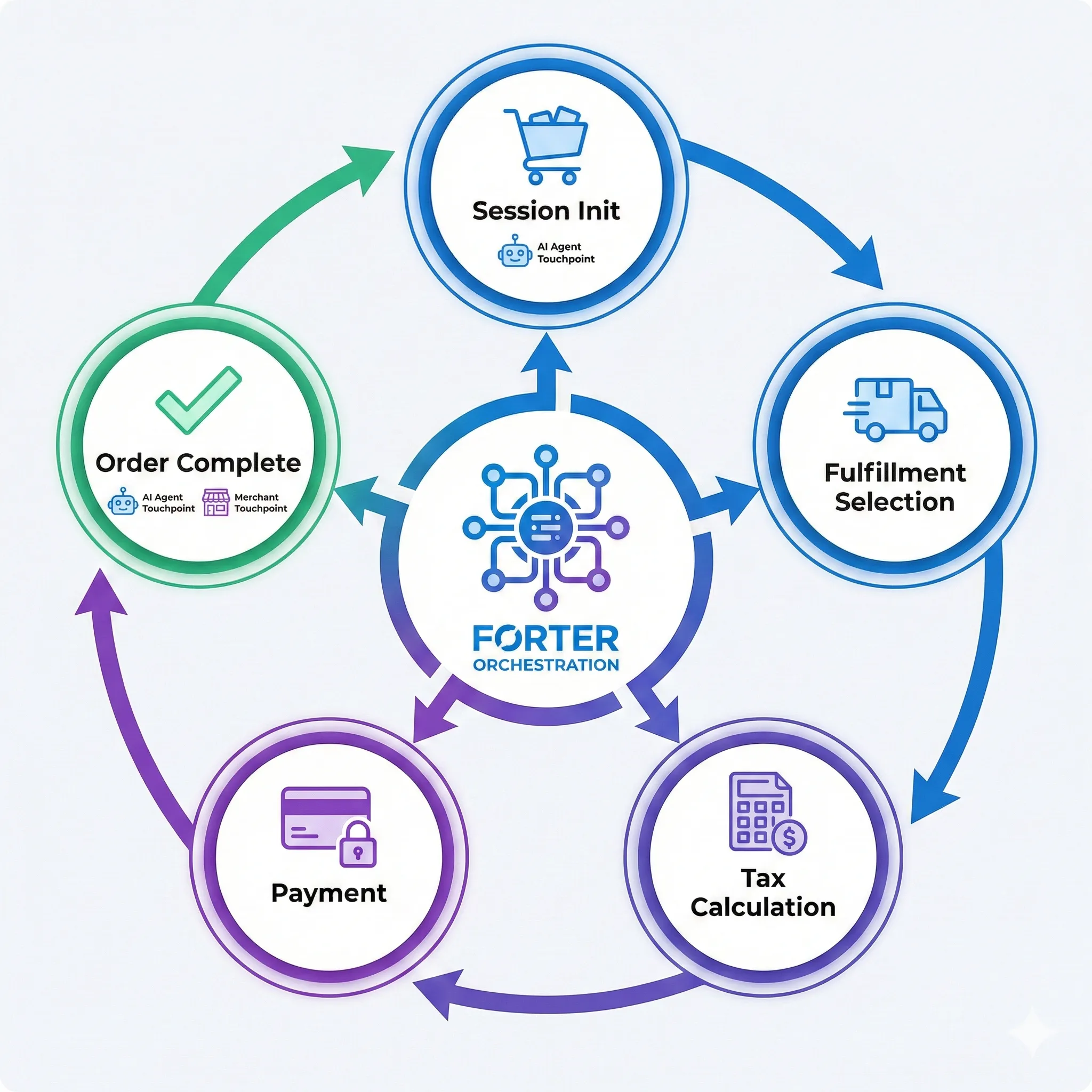
- Customer initiates purchase — A customer tells an AI agent they want to buy a product from your catalog
- Forter validates the order — We verify product availability, calculate shipping options, and compute taxes
- Payment is processed — The AI platform collects payment details securely; Forter processes the transaction through your configured payment provider
- Order is delivered to you — The completed order is sent to your backend via platform integration or webhook
From your perspective, agentic orders appear alongside your regular orders—same fulfillment process, same customer service workflow.
What You Need to Configure
Payment & Fraud Configuration
Forter implements the full Agentic Commerce Protocol (ACP) so you don't need to. However, you choose who handles payment processing and fraud validation:
Option A: Merchant-Side Payment Handling (Default - Recommended)
What happens:
- Forter creates orders in your system with payment references
- You process payments through your existing payment provider
- You handle fraud checks through your existing rules
What you configure in Forter Portal:
- Integration credentials (Shopify Admin API Token, SFCC OCAPI credentials, or Custom Webhook URL)
- Tax nexus regions for sales tax calculation
- Payment settings: is_validate=true, is_authorize=false, is_capture=false (default)
Best for: Most merchants who want to maintain control over payment processing and use existing payment infrastructure.
Option B: Forter-Side Payment Handling (Optional)
What happens:
- Forter validates orders for fraud before creating them in your system
- Forter authorizes/captures payments via Forter Payment Orchestration
- Orders are created in your system with completed payment status
What you configure in Forter Portal:
- Validation API Key — Forter fraud detection credentials (contact your Forter representative)
- Payment API Key — Forter payment orchestration credentials (contact your Forter representative)
- Payment settings: is_validate=true, is_authorize=true, is_capture=true (or false for manual capture)
- Supported payment providers: Stripe, Adyen, Braintree, or custom PSP
Best for: Merchants who want Forter to handle end-to-end fraud detection and payment processing.
What Forter always handles (regardless of option):
- Implementation of the full OpenAI Agentic Commerce Protocol
- PCI compliance and secure card tokenization (on separate PCI domain)
- Order state management and session handling
- Order delivery to your backend (via platform API or webhook)
Tax Nexus
Specify the US states where you have tax nexus. Forter calculates sales tax only for states where you're registered:
- State and county rate lookups
- Category-specific rules (clothing exemptions, food rates)
- Tax holiday detection (back-to-school, etc.)
Order Delivery
Completed orders are delivered to your backend based on your integration method:
Shopify Integration
Forter creates orders as draft orders in Shopify via the Admin API:
- Orders appear in Shopify Admin > Orders
- Can be auto-completed or manually reviewed before finalization
- Uses the same Shopify Admin API Access Token configured for catalog sync
SFCC Integration
Forter creates orders directly in SFCC via OCAPI Basket/Order APIs:
- Orders appear in Merchant Tools > Ordering > Orders
- Uses the same OCAPI Client ID/Secret configured for catalog sync
Custom Integration — Three Merchant Endpoints
For custom backends, Forter calls three separate POST endpoints during the checkout lifecycle. Each request includes an event envelope and agent context:
Endpoint Authentication:
Forter supports two authentication methods (both can be enabled simultaneously):
- Bearer Token: Authorization: Bearer {webhook_secret}
- HMAC-SHA256 Payload Signing: {Your-Store-Name}-Signature: hmac-sha256={hex_digest}
Configure which methods to enable in the Forter Portal under Merchant Platform.
1. Account Endpoint (event.type: "account.login") — Non-fatal
Looks up whether a customer exists. If it fails, checkout continues.
// Request
{
  "event": { "id": "evt_abc", "type": "account.login", "timestamp": "2026-02-09T12:00:00Z" },
  "agent": { "source": "openai", "platform": "chatgpt_instant_checkout" },
  "email": "[email protected]",
  "phone": "+14155551234"
}

// Response
{ "success": true, "account_id": "cust_123", "reference_id": "ref_abc", "status": "active" }
2. Cart Endpoint (event.type: "cart.created" | "cart.updated") — Fatal
Prices items, returns shipping options and totals. All prices in dollars (decimal), not cents.
// Request
{
  "event": { "id": "evt_def", "type": "cart.created", "timestamp": "2026-02-09T12:00:00Z" },
  "agent": { "source": "openai", "platform": "chatgpt_instant_checkout" },
  "reference_id": "ref_abc",
  "currency_id": "usd",
  "items": [{ "product_id": "SKU-001", "quantity": 2 }],
  "buyer": { "email": "[email protected]", "first_name": "John", "last_name": "Doe" },
  "recipient": { "shipping_id": "standard", "first_name": "John", "last_name": "Doe", "address": { "line_one": "123 Main St", "city": "San Francisco", "region_id": "ca", "country_id": "us", "postal_code": "94102" } }
}

// Response
{
  "success": true,
  "reference_id": "ref_abc",
  "items": [{ "product_id": "SKU-001", "quantity": 2, "price": 29.99, "effective_price": 29.99, "subtotal": 59.98 }],
  "shipping_options": [
    { "id": "standard", "title": "Standard Shipping", "description": "5-7 business days", "price": 5.99 }
  ],
  "totals": { "subtotal": 59.98, "discount": 0, "tax": 4.80, "shipping": 5.99, "total": 70.77 }
}
3. Checkout Endpoint (event.type: "order.created") — Fatal
Creates the order and processes payment. Includes a payment block with provider, token, and card metadata.
// Request
{
  "event": { "id": "evt_ghi", "type": "order.created", "timestamp": "2026-02-09T12:00:00Z" },
  "agent": { "source": "openai", "platform": "chatgpt_instant_checkout" },
  "reference_id": "ref_abc",
  "account_id": "cust_123",
  "currency_id": "usd",
  "items": [{ "product_id": "SKU-001", "quantity": 2, "price": 29.99, "effective_price": 29.99, "subtotal": 59.98 }],
  "buyer": { "email": "[email protected]", "first_name": "John", "last_name": "Doe", "phone": "+14155551234", "address": { "line_one": "123 Main St", "city": "San Francisco", "region_id": "ca", "country_id": "us", "postal_code": "94102" } },
  "recipient": { "shipping_id": "standard", "first_name": "John", "last_name": "Doe", "address": { "line_one": "123 Main St", "city": "San Francisco", "region_id": "ca", "country_id": "us", "postal_code": "94102" } },
  "payment": { "provider": "stripe", "token": "tok_visa_4242", "card": { "brand": "visa", "last4": "4242", "exp_month": 12, "exp_year": 2027 } },
  "totals": { "subtotal": 59.98, "discount": 0, "tax": 4.80, "shipping": 5.99, "total": 70.77 }
}

// Response
{ "success": true, "order_id": "ORD-12345" }
reference_id Flow: Any endpoint can return a reference_id in its response. Forter passes this ID to all subsequent endpoint calls, allowing you to correlate the account lookup, cart, and order in your system.
For full endpoint specifications and examples, see Custom Integration Guide.
---
## Portal Configuration
Configure these settings in the **Forter Portal** to enable checkout and payment processing:
### **1. Basic Store Information**
| Field | Description | Required |
|-------|-------------|----------|
| **Store Title** | Your store name (shown in AI platforms) | Yes |
| **Store URL** | Your store homepage | Yes |
| **Logo URL** | URL to your store logo | Optional |
| **Currency** | Primary currency (e.g., USD, EUR, GBP) | Yes |
### **2. Store Policies**
| Field | Description | Required |
|-------|-------------|----------|
| **Terms of Service URL** | Link to your terms | Yes |
| **Privacy Policy URL** | Link to your privacy policy | Yes |
| **Return Policy URL** | Link to your return policy | Yes |
| **Return Window (Days)** | Number of days for returns | Optional |
### **3. Integration Credentials**
Choose based on your integration method:
**Shopify Integration:**
| Field | Description | Required |
|-------|-------------|----------|
| **Shop Domain** | Your myshopify.com domain | Yes |
| **Admin API Access Token** | From Shopify custom app | Yes |
**SFCC Integration:**
| Field | Description | Required |
|-------|-------------|----------|
| **SFCC Instance URL** | Your SFCC instance | Yes |
| **Site ID** | Your site identifier | Yes |
| **OCAPI Client ID** | From OCAPI settings | Yes |
| **OCAPI Client Secret** | From OCAPI settings | Yes |
**Custom Integration:**
| Field | Description | Example | Required |
|-------|-------------|---------|----------|
| **Account Endpoint URL** | Customer account lookup | `"https://store.com/api/account"` | Optional |
| **Cart Endpoint URL** | Cart pricing and shipping | `"https://store.com/api/cart"` | Yes |
| **Checkout Endpoint URL** | Order creation | `"https://store.com/api/checkout"` | Yes |
| **Webhook Secret** | Secret for Bearer token and/or HMAC signing | Auto-generated or custom | Yes |
| **Authentication** | Enable Bearer token auth | Toggle on/off | Recommended |
| **Payload Signing** | Enable HMAC-SHA256 payload signing | Toggle on/off | Optional |
| **Order Status URL** | Template for order tracking | `"https://store.com/orders/{order_id}"` | Optional |
### **4. Payment & Fraud Settings**
**Default (Merchant-Side Handling):**
| Field | Description | Default |
|-------|-------------|---------|
| **Enable Forter Validation** | Forter fraud validation | `false` |
| **Enable Forter Authorization** | Forter payment authorization | `false` |
| **Enable Forter Capture** | Forter payment capture | `false` |
**Optional (Forter-Side Handling):**
| Field | Description | Required |
|-------|-------------|----------|
| **Validation API Key** | Forter fraud validation credentials | Yes (if enabled) |
| **Payment API Key** | Forter payment orchestration credentials | Yes (if enabled) |
| **Enable Forter Validation** | Forter fraud validation | Set to `true` |
| **Enable Forter Authorization** | Forter payment authorization | Set to `true` |
| **Enable Forter Capture** | Forter payment capture | `true` or `false` |
<!--  - NOT_CREATED_YET -->
### **5. Tax Configuration**
| Field | Description | Example | Required |
|-------|-------------|---------|----------|
| **Tax Nexus Regions** | US states where you collect sales tax | `["CA", "NY", "TX"]` | Yes (US merchants) |
**Note:** For Shopify merchants, Shopify's tax engine handles all tax calculations based on your Shopify tax settings. Forter uses Shopify's calculated taxes automatically.
<!--  - NOT_CREATED_YET -->
---
## Fraud Protection
Fraud protection depends on your payment handling configuration:
### **Merchant-Side Fraud Validation (Default)**
When you handle payments on your side (default configuration):
- **You** run fraud checks through your existing fraud prevention tools
- Forter creates orders in your system with payment references
- You validate and process payments according to your existing rules
### **Forter-Side Fraud Validation (Optional)**
When you enable Forter-side payment handling:
- Every transaction is protected by **Forter Identity Intelligence**
- **Risk Assessment** — Each order is evaluated for fraud risk before payment is processed
- **Behavioral Analysis** — Forter analyzes patterns across billions of transactions to identify suspicious activity
- **Configurable Actions** — Set rules for automatic approval, decline, or manual review based on risk scores
- Agentic purchases have different risk patterns than traditional e-commerce—Forter's models are trained to distinguish legitimate AI-assisted purchases from fraud
---
## Order Management
### Viewing Agentic Orders
Agentic orders flow into your existing systems based on your integration:
- **Shopify Integration** — Orders appear in **Shopify Admin > Orders** (as draft orders)
- **SFCC Integration** — Orders appear in **Merchant Tools > Ordering > Orders**
- **Custom Integration** — Orders delivered to your webhook endpoint as JSON payloads
Orders include metadata indicating they originated from an AI shopping agent.
### Returns and Refunds
Handle returns through your normal process. The order payload includes all necessary customer and shipping information for standard return workflows.
### Reporting
The Forter Dashboard provides visibility into agentic commerce:
- **Transaction Volume** — Checkout sessions and completed orders
- **Conversion Rates** — From session creation to order completion
- **Error Rates** — Failed checkouts and payment declines
<!--  - NOT_CREATED_YET -->
---
## API Endpoints
The checkout flow is implemented via the [OpenAI Agentic Commerce Protocol](https://developers.openai.com/commerce/specs/checkout):
| Step | Endpoint | Purpose |
|------|----------|---------|
| 1. Create Session | `POST /checkout_sessions` | Initialize checkout with cart items |
| 2. Select Fulfillment | `POST /checkout_sessions/{id}` | Add shipping address, select shipping option; tax is calculated |
| 3. Tokenize Payment | `POST /agentic_commerce/delegate_payment` | Securely tokenize payment credentials (PCI domain) |
| 4. Complete Order | `POST /checkout_sessions/{id}/complete` | Finalize order with payment token, process payment, proxy to backend |
| 5. Check Status | `GET /checkout_sessions/{id}` | Retrieve order status |
| 6. Cancel Session | `POST /checkout_sessions/{id}/cancel` | Cancel an in-progress session |
For complete endpoint documentation, see the API Reference in the public documentation.
---
## PCI Compliance
Forter handles all payment card data in a PCI DSS Level 1 compliant environment. Payment tokenization occurs on a separate PCI-compliant domain (`{site_id}.agentic-pci.checkouttools.com`). Your servers never receive or store raw card numbers—you remain outside of PCI scope.
---
## Related Documentation
- **[Quickstart Guide](../getting-started/Quickstart.md)** — Step-by-step integration setup
- **[Catalog & Inventory](Catalog.md)** — Connect your product data
- **[FAQ](../resources/FAQ.md)** — Common questions