FAQ
Common questions about Forter Agentic Orchestration.
General
What is Forter Agentic Orchestration?
Forter Agentic Orchestration is an orchestration layer that enables merchants to sell products through AI shopping agents like ChatGPT, Google Gemini, and Perplexity. It connects your existing e-commerce infrastructure to AI platforms without requiring you to rebuild your backend.
How is this different from traditional e-commerce?
In traditional e-commerce, customers browse websites and complete checkout forms. With agentic commerce, AI assistants handle product discovery, comparison, and checkout on behalf of consumers through conversational interfaces. Forter Agentic Orchestration provides the infrastructure that makes this possible.
Which AI platforms are supported?
- OpenAI/ChatGPT — Via the Agentic Commerce Protocol (ACP)
- Google Gemini — Via Merchant Center
- Perplexity — Optimized for citation-based shopping
- Private/Enterprise Agents — Via Universal Commerce Protocol (UCP)
Do I need to change my existing e-commerce platform?
No. Forter Agentic Orchestration is designed to work with your existing infrastructure. You continue using Shopify, Salesforce Commerce Cloud (SFCC), or your custom backend. Forter Agentic Orchestration acts as a bridge, not a replacement.
Integration
Which integration method should I choose?
Choose based on your e-commerce setup:
- Shopify Integration — If you use Shopify, Forter pulls your catalog via the Admin API and creates orders as draft orders. No feed hosting needed.
- SFCC Integration — If you use Salesforce Commerce Cloud, Forter pulls your catalog via OCAPI and creates orders directly. No feed hosting needed.
- Custom Integration — If you built your own commerce backend, host a product feed (Google Merchant Center XML, Shopify CSV, or JSON) at a stable URL and implement three merchant endpoints (Account, Cart, Checkout) to handle the checkout lifecycle.
See Quickstart Guide for detailed integration paths.
What are the three merchant endpoints for Custom Integration?
Custom Integration requires three POST endpoints that Forter calls during the checkout flow:
- Account Endpoint — Receives account.login events to look up customer accounts by email/phone. Returns account status (active, blocked, not_found). Non-fatal — if it fails, checkout continues.
- Cart Endpoint — Receives cart.created and cart.updated events with items, buyer, and recipient details. Must return priced items, shipping options, and totals (all prices in dollars, not cents). Fatal — if it fails, checkout cannot proceed.
- Checkout Endpoint — Receives order.created events with items, buyer, recipient, payment (provider + token + card metadata), and totals. Must process payment and return an order_id. Fatal — if it fails, the order is not created.
See Custom Integration Guide for full request/response schemas.
What is the reference_id and how is it used?
The reference_id is a sticky identifier that lets you correlate calls across the three merchant endpoints within a single checkout flow. Any endpoint response can include a reference_id field, and Forter will pass it to all subsequent endpoint calls. For example, your Account endpoint might return a reference_id that gets included in the Cart and Checkout requests, allowing you to link all three calls to the same customer session in your system.
What product feed formats are supported?
Feed formats are only needed for Custom Integration:
- Google Merchant Center XML — Standard shopping feed format
- Shopify CSV — Native Shopify product export format
- JSON — Custom JSON format
For Shopify and SFCC, Forter pulls your catalog directly via APIs—no feed hosting needed.
How often should I update my product feed?
For Custom Integration, configure your feed update frequency in the Forter Portal:
- Daily — Suitable for most merchants
- Hourly — For high-velocity inventory
- Custom — Contact Forter for specific schedules
For Shopify and SFCC, Forter continuously syncs your catalog. Use the /v1/inventory endpoint for real-time updates between syncs.
Can I update inventory in real-time?
Yes. The /v1/inventory endpoint accepts single updates or batches of up to 100 items. Updates are processed immediately and reflected to AI platforms.
How long does feed processing take?
Feed processing depends on catalog size:
- < 10,000 products: Minutes
- 10,000 - 100,000 products: Under an hour
- > 100,000 products: A few hours
What happens to products missing from a new feed?
Products not present in a full feed sync are soft-deleted (marked as unavailable), not permanently removed. This prevents accidental catalog loss from incomplete feeds.
Checkout & Payments
How does checkout work with AI agents?
- AI agent creates a checkout session with selected products
- User provides shipping address through the AI interface
- Forter Agentic Orchestration calculates tax and finalizes totals
- Agent submits payment credentials to PCI-compliant vault
- Forter Agentic Orchestration processes payment and proxies order to your backend
Do I need to be PCI compliant?
No. Forter Agentic Orchestration uses a delegated payment model where card data only touches our PCI-compliant vault. Your servers never see raw card numbers, removing you from PCI scope.
Who handles payment processing?
By default, you handle payments on your side (recommended for most merchants):
- Forter creates orders in your system with payment references
- You process payments through your existing payment provider
- You handle fraud checks through your existing rules
Optionally, Forter can handle payments (requires additional configuration):
- Forter validates orders for fraud before creation
- Forter authorizes/captures payments via Forter Payment Orchestration
- Orders are created in your system with completed payment status
- Supported providers: Stripe, Adyen, Braintree, or custom PSP
Contact your Forter representative to enable Forter-side payment processing.
Can customers use saved payment methods?
Yes, if your backend supports card-on-file. Forter Agentic Orchestration can reference existing customer payment tokens rather than requiring new card entry.
How is tax calculated?
Forter Agentic Orchestration includes a US sales tax engine with:
- State and county rate lookups
- Nexus-aware calculation (only states where you're registered)
- Category-specific rules (clothing exemptions, food rates)
- Tax holiday detection
Security & Compliance
How are API keys secured?
API keys are securely hashed before storage—the raw key is never stored and cannot be retrieved. If you lose a key, a new one must be generated.
Is the platform PCI compliant?
Yes. Payment operations occur on a separate PCI DSS Level 1 compliant domain. The non-payment domain never handles card data.
How is fraud prevented?
Every transaction is protected by Forter Identity Intelligence, which analyzes:
- Device and behavioral signals
- Network patterns
- Historical transaction data
- Real-time risk scoring
Can I restrict API access by IP?
Yes. Contact your Forter representative to configure IP allowlisting for your API keys.
Operations
How do I monitor my integration?
The Forter Dashboard provides:
- Catalog Health — Feed sync status, product counts, validation errors
- Transaction Volume — Checkout sessions created, completed, failed
- Semantic Hits — How often AI agents discover your products
- Error Rates — Failed checkouts, payment declines
What happens if an AI agent tries to buy an out-of-stock item?
Forter Agentic Orchestration validates inventory at checkout session creation. Out-of-stock items are rejected with a clear error. The Inventory Heartbeat feature keeps stock levels synchronized to minimize stale data.
How do I handle returns for agentic orders?
Returns are handled through your normal process. Orders proxied to your backend include all necessary customer and order information for standard return workflows.
Is there a sandbox for testing?
Yes. Use sk_test_* API keys to access sandbox mode:
- No real payments processed
- Orders not sent to your backend
- Test card numbers accepted
- Full API functionality available
Pricing & Support
What support is available?
- Documentation — This documentation site
- Technical Support — Via your Forter representative
- Dashboard — Self-service monitoring and configuration
- Integration Assistance — Dedicated support during onboarding
Is there an SLA?
Yes. Production environments include uptime SLAs. Contact your Forter representative for specific terms.
Troubleshooting
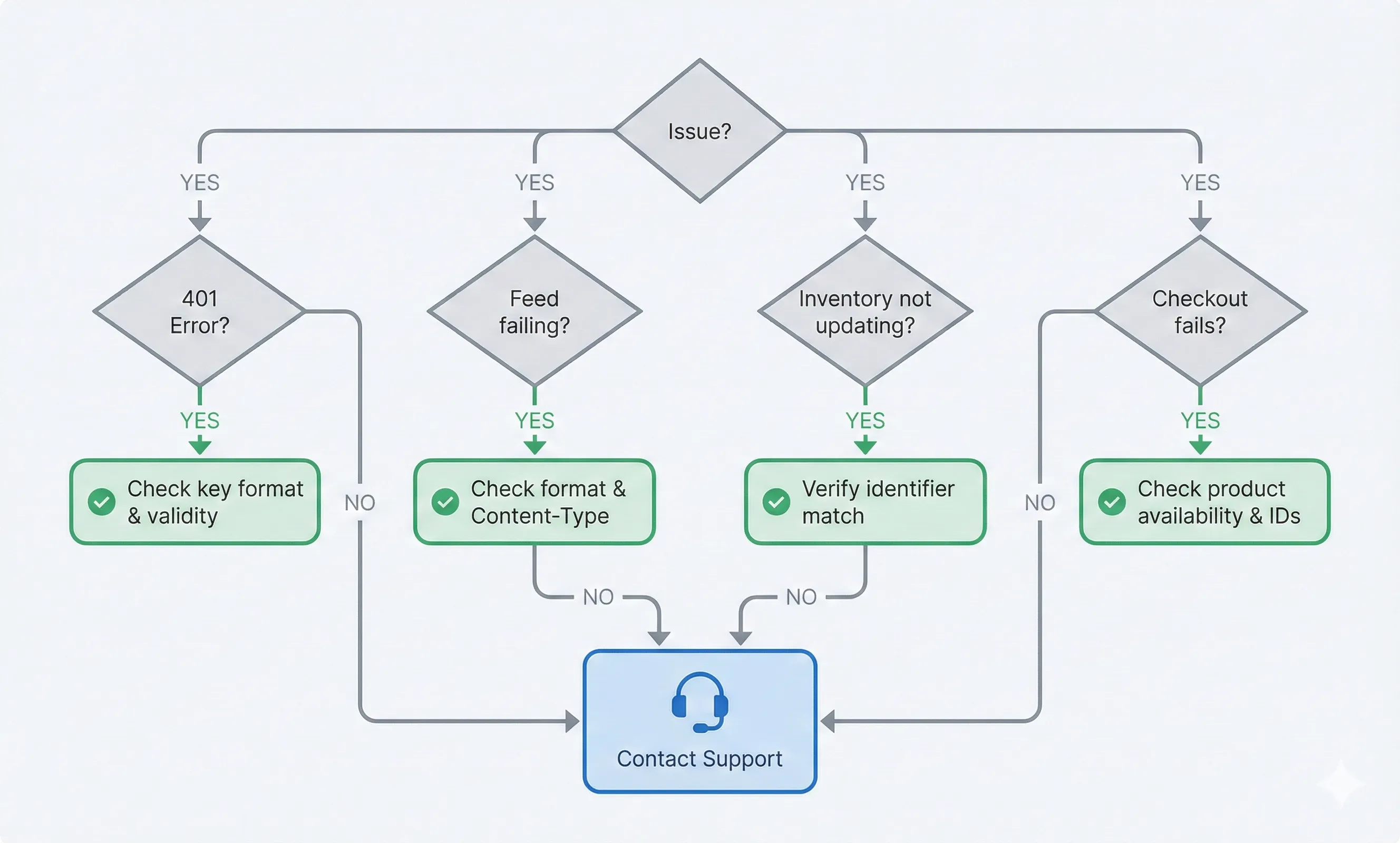
My feed is not syncing (Custom Integration).
- URL accessibility — Verify your feed URL returns 200 OK and is publicly accessible (or properly authenticated)
- Format — Ensure the format matches what you specified (google = XML, shopify = CSV, json = JSON)
- Content-Type — Use application/xml for XML feeds, text/csv for CSV feeds, application/json for JSON feeds
- File size — Ensure the file isn't empty and is under 500MB
- Response time — Feed must respond within 30 seconds
- Authentication — If using HTTP Basic Auth or other authentication, verify credentials are correct in Forter Portal
My merchant endpoints are failing (Custom Integration).
- Use the Portal Test Tool — Navigate to Merchant Platform > Test Endpoints in the Forter Portal to run automated tests against all three endpoints
- Check authentication — If Bearer token auth is enabled, verify your endpoint checks Authorization: Bearer {secret}. If HMAC signing is enabled, verify signature validation logic.
- Cart endpoint — Ensure you return items with price, effective_price, subtotal; a shipping_options array; and a totals object. All prices must be in dollars (decimal), not cents.
- Checkout endpoint — Ensure you return { "success": true, "order_id": "..." } and that payment processing completes within 10 seconds
- Account endpoint — This endpoint is non-fatal; failures here won't block checkout but may affect account correlation
- Response format — All endpoints must return Content-Type: application/json
My catalog is not syncing (Shopify/SFCC).
- API credentials — Verify your Admin API Access Token (Shopify) or OCAPI Client ID/Secret (SFCC) are correct
- API permissions — Ensure proper scopes/permissions are configured (see platform-specific integration guides)
- Rate limits — Check if you're hitting Shopify/SFCC API rate limits
- Product visibility — Verify products are published and active in your platform
- Dashboard logs — Review Forter Portal logs for specific sync errors
I'm getting 401 Unauthorized errors.
- Key format — Ensure the header is Authorization: Bearer sk_... (with space after Bearer)
- Key validity — Verify the key hasn't been rotated or revoked
- Environment — Test keys don't work in production and vice versa
Inventory updates aren't reflected.
- Identifier match — Verify the id, gtin, or mpn matches a product in your catalog
- Response check — Review the results array in the response for specific errors
- Processing delay — Updates are near-instant but allow a few seconds for propagation
Orders aren't appearing in my backend.
- Integration status — Verify your order proxy is configured correctly in the Forter Dashboard
- Endpoint URLs — If using Custom Integration, ensure all three endpoint URLs (Account, Cart, Checkout) are accessible and returning 200 OK. Use the Portal Endpoint Test Tool to validate.
- Platform credentials — If using Shopify/SFCC, verify your API credentials are valid
- Dashboard logs — Check the Forter Dashboard for order delivery errors
- Cart endpoint — If the Cart endpoint fails, checkout cannot proceed and no order will be created
Still Have Questions?
Contact your Forter representative or email support for additional assistance.
Related Documentation
- Quickstart Guide — Step-by-step integration guide
- Catalog & Inventory — Product data synchronization
- Checkout & Payments — Payment processing and order management