電話注文
SFCCの電話注文
お客様が電話で行った注文に対して、当社独自のWebid電話ソリューションを提供しています。統合の概要と手順は以下に示されています。
概要
Forterの顧客Web Id電話ソリューションにより、Forterはお客様サポートチームが電話でお客様の代わりに行う注文に対して詐欺の判断を提供できます。お客様が注文を行うためにサポートセンターに電話をかけた際、顧客サポート担当者はお客様にサイトを訪問し、ウェブサイトの画面の下部に表示される9桁の顧客Web Idを読むよう指示する必要があります。その後、顧客サポート担当者はこの番号をSFCC管理の専用customerWebIdフィールドに入力し、他の注文データと一緒に含める必要があります。この9桁の顧客Web Idは各エンドユーザーに固有であり、Forterのモデルが電話で行われる注文に関連する特定のサイバーおよび行動データポイントを接続するのに役立ちます。
統合手順
ステップ1: サイトのフロントエンドにJavaScriptを追加する
SFCCの場合、JavaScriptはcheckout.ismlおよびpage.ismlテンプレートを介して自動的にサイトのフロントエンドに注入される必要があります。ただし、ポータルからスクリプトを関連する閉じる</html>ボディタグに貼り付けて手動でJSを追加する必要があるかもしれません。
ステップ2: ウェブサイトのフロントエンドに顧客Web Idを表示する
ForterのJavaScriptは、ページを表示する際に顧客に公開する必要がある9桁のコードを自動的にレンダリングします。この顧客Web Idがページのどこに表示されるか、どのようにスタイルされるかを制御できます。顧客が電話で注文を行う際に、顧客サポート担当者に読み上げることができるように、顧客に見えるようにする必要があります。
ステップ3: 顧客Web Idの入力を処理する
私たちのSFCC管理者では、顧客が電話で注文をする際に読む顧客ウェブIDを顧客サポートチームが入力するためのフィールドを作成する必要があります。このフィールドは、専任の顧客サポートスタッフのみが表示またはアクセスできるようにするべきです。もし、顧客注文を行うための専用インターフェースがSFCCビジネスマネージャーに既にある場合は、そこに顧客ウェブIDの入力フィールドを追加することをお勧めします。
ステップ4: 顧客ウェブIDをForterに送信する
あなたの ForterOrder.js ファイルのカートリッジに、orderTypeを更新し、connectionInformationオブジェクトのフィールドを空の文字列に設定し、Forterに対して決定を求めるAPI呼び出しにForter顧客ウェブIDを含めるロジックを追加します。例えば、ForterOrder(args, request, authorizationStep) 関数内で、orderTypeを決定するロジックを含め、phoneOrderInformation.customerWebId、phoneOrderInformation.callerIdを含め、WebIdフィールドが入力されているかどうか、そして注文が電話注文であるかに基づいてconnectionInformationオブジェクトを修正することができます。以下の例コードは、このロジックが推奨される場所を示していますが、正確なチェックアウトフローと受け入れられる注文タイプに基づいてさらに修正する必要があります。
function ForterOrder(args, request, authorizationStep) {
    var ForterLogger = require('*/cartridge/scripts/lib/forter/ForterLogger');
    var log = new ForterLogger('ForterOrder.ds');
    var order = args.Order;
    var paymentInstruments = order.getPaymentInstruments();
    var payment = null;
    var authResponse = null;
    var shipment = null;
    var i;

    for (i = 0; i < paymentInstruments.length; i++) {
        var paymentInstrument = paymentInstruments[i];

        if (paymentInstrument.paymentMethod === 'CREDIT_CARD') {  // adjust to the existing payment instruments
            payment = paymentInstrument;
            authResponse = JSON.parse(paymentInstrument.custom.authorize_net_authorization_json);
        } else if (paymentInstrument.paymentMethod === 'PayPal' || paymentInstrument.paymentMethod === 'BML') {  // adjust to the existing payment instruments
            payment = paymentInstrument;
            authResponse = paymentInstrument.custom.paypal_transaction_details_response;
        }
    }

    function determineOrderType(order) { // example function to determine orderType
        if (order.webId && order.webId.length === 9) {
            return 'PHONE';
        } return 'WEB';
    }

    function connectionInformationRenderer(order, request) { //example function for webId
        if (order.webId) {
            this.customerIP = '';
            this.userAgent = '';
            this.forterTokenCookie = '';
        }
        this.customerIP = request.httpRemoteAddress;                    // Required
        this.userAgent = request.httpUserAgent;
        this.forterTokenCookie = '';

        for (var i = 0; i < request.httpCookies.cookieCount; i++) {
            if (request.httpCookies[i].name === 'forterToken') {
                this.forterTokenCookie = request.httpCookies[i].value;   // Required
            }
        }
    }

    this.phoneOrderInformation = {
	    customerWebId = order.webId.trim();  // webId field for phone orders
        callerId = order.callerPhone; // phone number used when customer called to place an order
        callerFirstName = order.phoneFirstName[0] || ''; // modify to pass first name of caller
        callerLastName = order.phoneLastName[1] || ''; // modify to pass last name of caller
	};
    this.orderId = order.originalOrderNo;
    this.orderType = determineOrderType(order);
    this.timeSentToForter = (new Date()).getTime();
    this.checkoutTime = Number((order.creationDate.getTime() / 1000).toFixed());    // Required //must be seconds, not milliseconds
    this.connectionInformation = connectionInformationRenderer(order, request);    // Required
    this.authorizationStep = authorizationStep;
}
ステップ 5: フローをテストする
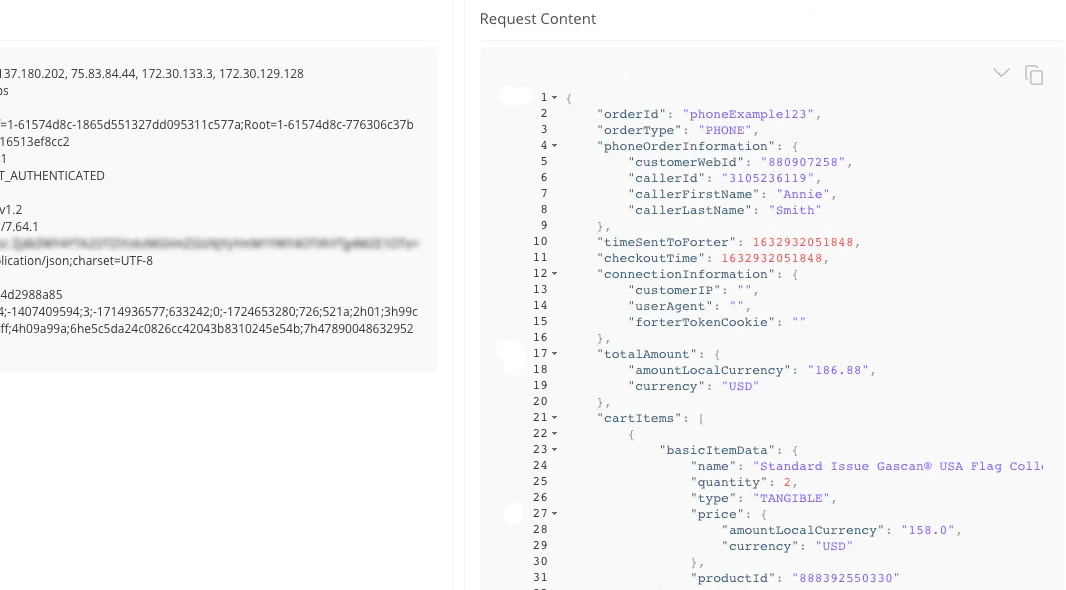
あなたのサンドボックス環境で、サイトのフロントエンドでJSによってレンダリングされる9桁のコードを、SFCCビジネスマネージャーで作成した専用の Customer Web Id フィールドに追加してください。
現在の電話注文の流れで残りの注文を送信し、その後、あなたの Forter APIリクエストビューワー
リクエストビューワーでは、"connectionInformation" オブジェクトは主に空の文字列を持ち、"orderType" は"PHONE" であり、customerWebId とcallerFirstName, callerLastName, およびcallerId, は専用の"phoneOrderInformation" オブジェクトに表示される必要があります。