SFRA
SFRA プレ認証統合
以下の指示は、SFCC ストアフロントの SFRA バージョンを使用しているすべてのストアフロントのための Forter のプレ認証統合に使用されるべきです。
注意 SFRA ベースのウェブサイトの場合、CheckoutServices.js ファイルには Forter プレ認証を呼び出すためのコメント付きコードが含まれています。プレ認証フローでは、このコードは コメント解除 される必要があります。そうしないと、CheckoutServices.js ファイル内の PlaceOrder エンドポイントが置き換えられません。
CheckoutServices.js ファイルを更新する
Forter カートリッジ内の CheckoutServices.js ファイルに移動します。このファイルへの正確なパスは: Cartridges > int_forter_sfra > cartridge > controllers > CheckoutService.js.
このファイルを開き、コメント解除する必要があるコードを AFTER var order = COHelpers.createOrder(currentBasket); 関数の後に、BEFORE var handlePaymentResult = COHelpers.handlePayments(order, order.orderNo); 関数の前に配置します。
    var orderNumber = order.getCurrentOrderNo(); var argOrderValidate = {
        orderNumber : orderNumber,
        orderValidateAttemptInput : 1,
        authorizationStep: “PRE_AUTHORIZATION”
    },

    forterCall = require(‘*/cartridge/scripts/pipelets/forter/forterValidate’),
    forterDecision = forterCall.validateOrder(argOrderValidate);

    // in case if no response from Forter, try to call one more time
    if (forterDecision.result === false && forterDecision.orderValidateAttemptInput == 2) {
        var argOrderValidate = {
            orderNumber : orderNumber, orderValidateAttemptInput : 2,
            authorizationStep: “PRE_AUTHORIZATION”
        },
        forterCall = require(‘*/cartridge/scripts/pipelets/forter/forterValidate’),
        forterDecision = forterCall.validateOrder(argOrderValidate);
    }
    if (forterDecision.JsonResponseOutput.processorAction == ‘void’) {
        Transaction.wrap(function () { OrderMgr.failOrder(order, true); });
        if (!empty(forterDecision.PlaceOrderError)) {
            res.json({
                error : true,
                errorMessage : forterDecision.PlaceOrderError.code
            });
        } else {
            res.json({
                error : true,
                errorMessage : Resource.msg(‘error.technical’, ‘checkout’, null)
            });
        }
    this.emit(‘route:Complete’, req, res);
    return;
    }
以下に含まれるスクリーンショットと完全なコード CheckoutServices.js ファイルは、この追加コードが CheckoutServices.js ファイル内のどこに配置されるべきかを示しています。
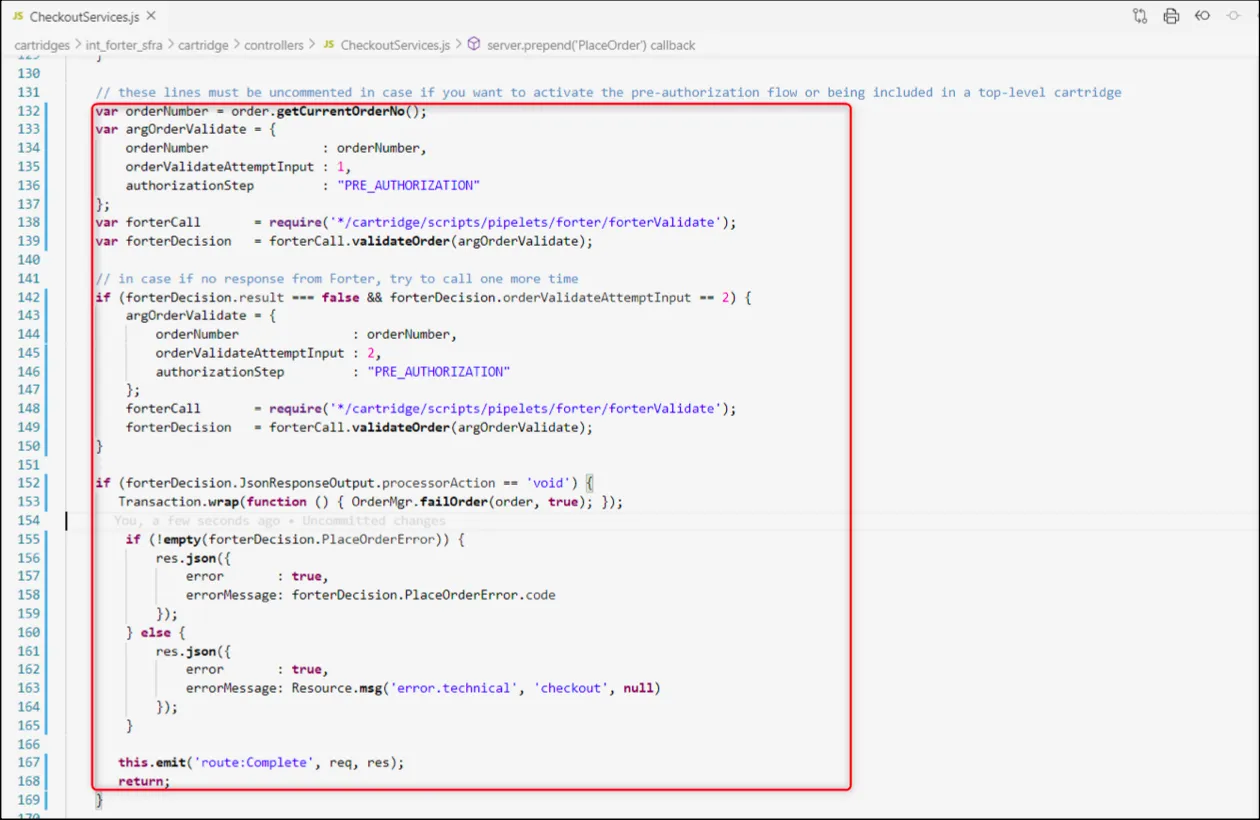
オプション 1: 事前認証および事後認証の決定
Forterからの認証後の決定を受け取るために、以下の手順に従ってください。このフローでは、支払いゲートウェイに電話する前に、バイナリの承認/拒否の決定を受け取ります prior あなたのゲートウェイからの認証応答を受け取った後に。
1. 認証後の検証呼び出しのためのマッピングを含める
CheckoutServices.jsファイルのコードのコメントを外した後、forterOrder.jsファイルのマッピングをカスタマイズする必要があります (cartridges > int_forter_sfra > cartridge > scripts > lib > forter > dto > forterOrder.js) で、ゲートウェイからの認証応答をForterへの認証後の呼び出しに含める必要があります。正確なマッピングは、ForterCreditCard(auth, cc)関数内のverificationResultsオブジェクトにあります。
サンプル forterOrder.js マッピング
    function ForterCreditCard(auth, cc) {
    var processorResponseCode = '';
    var processorResponseText = '';
    var creditCardExpMonth;

    // format the expiration month. from 1 to 01, etc.
    if (cc.creditCardExpirationMonth.toString().length === 1) {
        creditCardExpMonth = '0' + cc.creditCardExpirationMonth.toString();
    } else {
        creditCardExpMonth = cc.creditCardExpirationMonth.toString();
    }

    this.nameOnCard = cc.creditCardHolder;
    this.cardBrand = cc.creditCardType;

    if (cc.creditCardNumber.substring(0, 6).indexOf('*') > -1) {
        this.bin = session.forms.billing.creditCardFields.cardNumber.value.substring(0, 6); // session.forms.billing.paymentMethods.creditCard.number.value.substring(0, 6);
    } else {
        this.bin = cc.creditCardNumber.substring(0, 6);
    }

    this.lastFourDigits = cc.creditCardNumberLastDigits;
    this.expirationMonth = creditCardExpMonth;
    this.expirationYear = cc.creditCardExpirationYear.toString();

    this.verificationResults = {};
    this.verificationResults.avsFullResult = auth ? auth.avsResultCode.toString() : '';     // must be adjusted according to the payment gateway used
    this.verificationResults.cvvResult = auth ? auth.cvvResultCode.toString() : '';         // must be adjusted according to the payment gateway used
    this.verificationResults.authorizationCode = auth ? auth.authCode.toString() : '';      // must be adjusted according to the payment gateway used

    this.paymentGatewayData = {};
    this.paymentGatewayData.gatewayName = 'AUTHORIZE.NET';                  // must be adjusted according to the payment gateway used
    this.paymentGatewayData.gatewayTransactionId = auth ? auth.transId.toString() : ''; // must be adjusted according to the payment gateway used

    if (auth && auth.errors.errorCode.length > 0) {                           // must be adjusted according to the payment gateway used
        processorResponseCode = auth.errors.errorCode.toString();     // must be adjusted according to the payment gateway used
        processorResponseText = auth.errors.errorText.toString();     // must be adjusted according to the payment gateway used
    } else if (auth && auth.messages.code.length > 0) {                       // must be adjusted according to the payment gateway used
        processorResponseCode = auth.messages.code.toString();        // must be adjusted according to the payment gateway used
        processorResponseText = auth.messages.description.toString(); // must be adjusted according to the payment gateway used
    }

    this.verificationResults.processorResponseCode = processorResponseCode;
    this.verificationResults.processorResponseText = processorResponseText;
}
2. ビジネスマネージャーを更新する**
- 上記に追加したコードは、あなたの CheckoutServices.js ファイルが、決済ゲートウェイへの認証呼び出しが行われる 前 に、ストアフロントが注文情報をForterエンドポイントに送信できるようにします。
- Forterビジネスマネージャー拡張機能を更新して、更新された事前認証フローに対してカスタマイズされたエラーメッセージを表示するようにしてください。
オプション2: 事後認証注文ステータスによる事前認証決定
この構成では、あなたは事前認証のForter決定のみを受け取ります(事前に決済ゲートウェイを呼び出す)そして、ゲートウェイからの認証応答は、Forterへのその後の注文ステータス呼び出しに含まれます。
1. 注文ステータスを更新する
以下のAuthorize.netスクリプトの例は、クレジットカード処理を扱うスクリプトを更新して、Forterへの関連する事後認証注文ステータス呼び出しを含める方法を示しています。デフォルトの2つの注文ステータスは次のとおりです:
- "処理中"(ゲートウェイが支払いを承認したとき)
- "商人によってキャンセルされた"(ゲートウェイ/プロセッサが支払いを承認していないとき)
以下のコード例は、すべてのSFRAおよびSG事前認証/ステータス実装に適用され、完全な postAuthOrderStatusUpdate() 関数はforterValidate.jsファイルにあります(cartridges > int_forter_sfra > cartridge > scripts > pipelets > forter > forterValidate.js)
注文状況の呼び出しは 直ちに 支払いが承認された後に行うべきです
    var argOrderUpdate = {
        orderNumber: orderNumber,
        updateAttempt: 1
    },
    forterCall = require('*/cartridge/scripts/pipelets/forter/forterValidate'),
    forterDecision = forterCall.postAuthOrderStatusUpdate(argOrderUpdate, "PROCESSING");

    if (forterDecision.result === false && forterDecision.updateAttempt == 2) {
        forterDecision.updateAttempt = 2;
        forterCall.postAuthOrderStatusUpdate(argOrderUpdate, "PROCESSING");
    }
2. ForterUpdate.jsファイルをカスタマイズする
事前承認コード CheckoutServices.js ファイルのコメントを解除した後、forterUpdate.js ファイルをカスタマイズして、あなたのゲートウェイの承認応答をForterへのステータス呼び出しに含めます。forterUpdate.js ファイルの正確なパスは cartridges > int_forter_sfra > cartridge > scripts > lib > forter > dto > forterUpdate.js)です。 ForterPayment(payment, order) 関数をカスタマイズして、特定のゲートウェイ承認応答をマッピングします。
3. ビジネスマネージャーを更新する
上記に追加したコードは、あなたの CheckoutServices.js ファイルが、決済ゲートウェイへの認証呼び出しが行われる 前に、注文情報をForterエンドポイントに送信できるようにします。
また、あなたは Forterビジネスマネージャー 拡張機能 を更新して、この更新された事前認証フローのためのカスタマイズされたエラーメッセージを表示する必要があります。